OAuth 2.0 and OpenID Connect Explained
A developer's guide to OAuth 2.0 and OpenID Connect: roles, the authorization code flow with PKCE, access, refresh and ID tokens, JWT validation, scopes, other grant types and security best practices.
Every "Sign in with Google" button and every app that asks to "access your calendar" relies on OAuth 2.0. Add OpenID Connect (OIDC) on top and you get standard login. Understanding these two protocols is essential for building secure web, mobile and API backends.
Authorization vs authentication#
| OAuth 2.0 | OpenID Connect | |
|---|---|---|
| Question it answers | "What is this app allowed to do?" (authorization) | "Who is the user?" (authentication) |
| Main token | Access token | ID token (a JWT) plus access token |
| Example | A photo printing app reads your Google Photos | "Sign in with Google" on a website |
Access tokens are meant for APIs, not for the client to identify the user. Use OIDC's ID token for authentication.
The four roles#
- Resource owner: the user who owns the data.
- Client: the application that wants access (your web, mobile or SPA app).
- Authorization server: authenticates the user and issues tokens (Google, Auth0, Keycloak, Okta, Microsoft Entra ID).
- Resource server: the API that holds the data and accepts access tokens.
The authorization code flow with PKCE#
This is the recommended flow for almost every app today, including single-page and mobile apps.
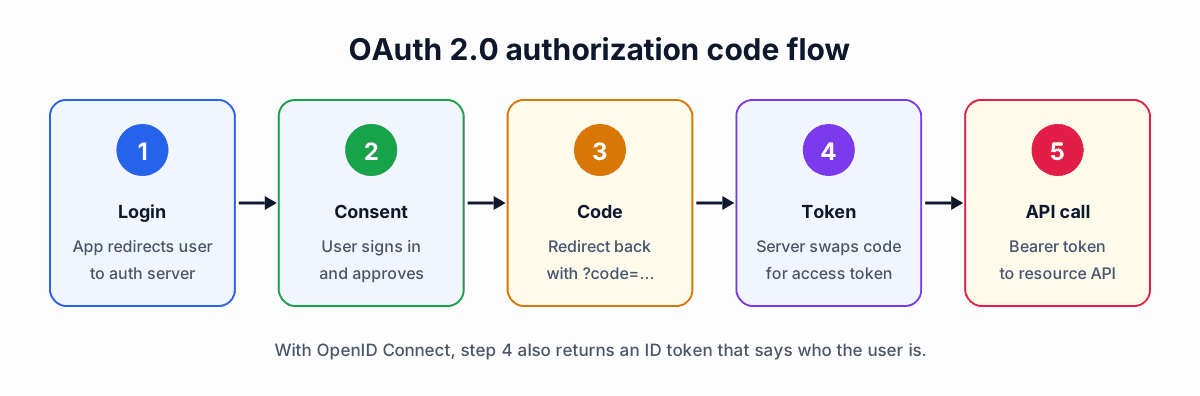
- The client creates a random
code_verifierand its SHA-256 hash, thecode_challenge. - The client redirects the user to the authorization server with the challenge, requested scopes and a random
state. - The user logs in and approves the requested permissions (consent).
- The authorization server redirects back with a short-lived authorization code.
- The client exchanges the code plus the original
code_verifierfor tokens. - The client calls the API with the access token in the
Authorizationheader.
Step 1–2: build the authorization request#
// Generate PKCE values in the browser
function base64url(bytes) {
  return btoa(String.fromCharCode(...new Uint8Array(bytes)))
    .replace(/\+/g, "-").replace(/\//g, "_").replace(/=+$/, "");
}

const verifier = base64url(crypto.getRandomValues(new Uint8Array(32)));
const challenge = base64url(
  await crypto.subtle.digest("SHA-256", new TextEncoder().encode(verifier))
);
const state = base64url(crypto.getRandomValues(new Uint8Array(16)));
sessionStorage.setItem("pkce_verifier", verifier);
sessionStorage.setItem("oauth_state", state);

const params = new URLSearchParams({
  response_type: "code",
  client_id: "my-app",
  redirect_uri: "https://app.example.com/callback",
  scope: "openid profile email",
  state,
  code_challenge: challenge,
  code_challenge_method: "S256",
});
location.href = `https://auth.example.com/authorize?${params}`;
Step 4: the callback#
GET https://app.example.com/callback?code=SplxlOBeZQQYbYS6WxSbIA&state=af0ifjsldkjStep 5: exchange the code for tokens#
POST /token HTTP/1.1
Host: auth.example.com
Content-Type: application/x-www-form-urlencoded

grant_type=authorization_code
&code=SplxlOBeZQQYbYS6WxSbIA
&redirect_uri=https://app.example.com/callback
&client_id=my-app
&code_verifier=dBjftJeZ4CVP-mB92K27uhbUJU1p1r_wW1gFWFOEjXk{
"access_token": "eyJhbGciOiJSUzI1NiIs...",
"token_type": "Bearer",
"expires_in": 3600,
"refresh_token": "8xLOxBtZp8",
"id_token": "eyJhbGciOiJSUzI1NiIs...",
"scope": "openid profile email"
}If an attacker intercepts the authorization code, they still can't redeem it without the secret code_verifier, which never left the client. The state parameter separately protects against CSRF on the callback.
The three token types#
| Token | Purpose | Lifetime | Sent to |
|---|---|---|---|
| Access token | Call protected APIs | Short (5–60 min) | Resource server |
| Refresh token | Get new access tokens without re-login | Long (days to months), often rotated | Authorization server only |
| ID token (OIDC) | Tells the client who logged in | Short | Never sent to APIs; read by the client |
Inside a JWT#
Tokens are often JSON Web Tokens: header.payload.signature, each part base64url-encoded.
// Decoded ID token payload
{
  "iss": "https://auth.example.com",
  "sub": "248289761001",
  "aud": "my-app",
  "exp": 1760200000,
  "iat": 1760196400,
  "nonce": "n-0S6_WzA2Mj",
  "email": "asha@example.com",
  "name": "Asha Verma"
}
Validating tokens on the API#
// npm install jose
import { createRemoteJWKSet, jwtVerify } from "jose";

const JWKS = createRemoteJWKSet(
  new URL("https://auth.example.com/.well-known/jwks.json")
);

export async function requireAuth(req, res, next) {
  const token = req.headers.authorization?.replace(/^Bearer /, "");
  if (!token) return res.status(401).json({ error: "missing token" });
  try {
    const { payload } = await jwtVerify(token, JWKS, {
      issuer: "https://auth.example.com",
      audience: "orders-api",
    });
    if (!payload.scope?.split(" ").includes("orders:read")) {
      return res.status(403).json({ error: "insufficient scope" });
    }
    req.user = payload;
    next();
  } catch {
    res.status(401).json({ error: "invalid token" });
  }
}
Always check the signature, issuer, audience and expiry, then enforce scopes. For opaque (non-JWT) tokens, call the authorization server's introspection endpoint instead.
Other grant types#
| Grant | Use it for | Status |
|---|---|---|
| Authorization code + PKCE | Web, SPA, mobile and desktop apps with a user | Recommended |
| Client credentials | Service-to-service calls with no user | Recommended |
| Device authorization | Smart TVs, CLIs and devices without a browser | Recommended |
| Refresh token | Renewing access tokens | Recommended (with rotation) |
| Implicit | Old SPAs: tokens in the URL fragment | Deprecated |
| Resource owner password | App collects the user's password directly | Deprecated |
# Client credentials: a backend job calling another service
curl -X POST https://auth.example.com/token \
  -d grant_type=client_credentials \
  -d client_id=report-worker \
  -d client_secret=$CLIENT_SECRET \
  -d scope=orders:read
Security best practices#
- Use authorization code + PKCE for every user-facing client; never use implicit or password grants.
- Register exact redirect URIs; never allow wildcards.
- Always send and verify
state(andnoncefor OIDC). - Keep access tokens short-lived and rotate refresh tokens.
- In browsers, prefer a backend-for-frontend that stores tokens server-side with HttpOnly, Secure, SameSite cookies, rather than putting tokens in
localStorage. - Request the minimum scopes you need.
- Use HTTPS everywhere.
Token validation fits naturally into an API gateway in front of your microservices. For handling API errors on the client, see Fetch API error handling.
Key takeaways#
- OAuth 2.0 handles authorization (what an app can access); OpenID Connect adds authentication (who the user is).
- Authorization code flow with PKCE is the recommended flow for web, SPA and mobile apps.
- Access tokens call APIs, refresh tokens renew them, and ID tokens identify the user to the client.
- APIs must verify a JWT's signature, issuer, audience, expiry and scopes.
- Avoid the implicit and password grants, use exact redirect URIs and keep tokens out of insecure storage.