Git Rebase vs Merge: When to Use Each (With a Safe Team Workflow)
Understand the real difference between git merge and git rebase, see what each does to your history, learn interactive rebase, and follow a safe workflow that never breaks a teammate's branch.

Sooner or later every developer hits this question: should I git merge or git rebase? Both bring changes from one branch into another. The difference is what your history looks like afterwards, and whether you rewrite commits that other people already have.
The starting point#
You branched feature off main. Since then, you made two commits and a teammate pushed two commits to main:
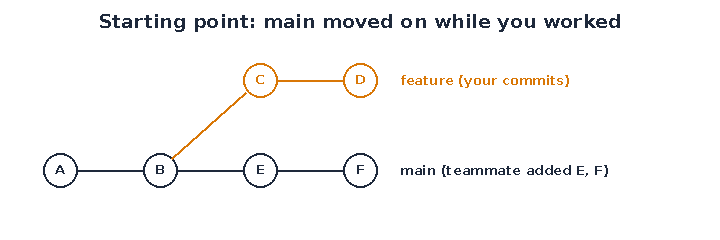
          C---D        feature
         /
A---B---E---F          main
Now you want your branch to include E and F.
Option 1: Merge#
git switch feature
git merge main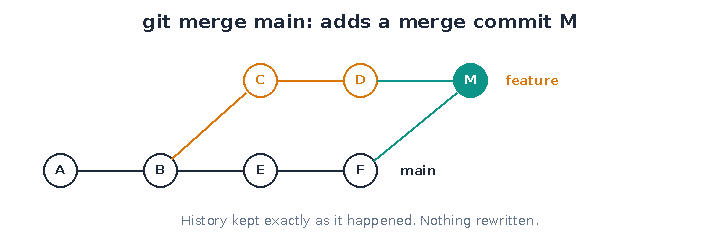
          C---D---M    feature
         /       /
A---B---E---F----      main
Git creates a new merge commit M with two parents. Nothing that existed before is changed.
- Pros: safe, never rewrites history, shows exactly when branches came together.
- Cons: frequent merges from
mainfill the log with "Merge branch 'main'" commits and make it harder to read.
Option 2: Rebase#
git switch feature
git rebase main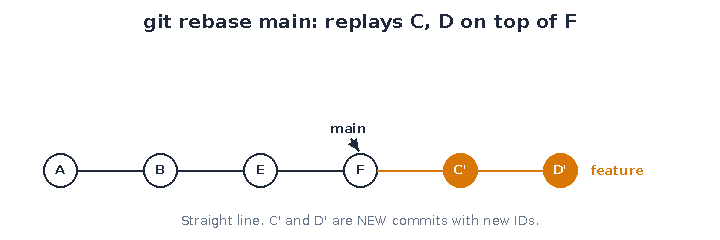
                  C'--D'   feature
                 /
A---B---E---F            main
Git takes your commits C and D, sets them aside, moves your branch to the tip of main, and replays them one by one. The result is new commits C' and D': same changes, new commit IDs.
- Pros: a clean, straight-line history that reads like a story.
- Cons: it rewrites commits. If someone else already pulled C and D, their copy and yours now disagree.
The golden rule of rebasing#
Never rebase commits that other people have based work on. Rebase your own local or personal branch freely. Never rebase main or a shared branch that teammates pull from.
After rebasing a branch you had already pushed, a normal push is rejected, because the history changed. Use:
git push --force-with-lease--force-with-lease refuses to overwrite the remote if someone else pushed to it in the meantime. Prefer it over plain --force, which overwrites blindly.
Resolving conflicts#
| Merge | Rebase | |
|---|---|---|
| How often | Once, for all changes | Possibly once per commit |
| Continue | git commit | git rebase --continue |
| Give up | git merge --abort | git rebase --abort |
During a rebase, fix the conflicted files, git add them, then run git rebase --continue. If it gets messy, git rebase --abort puts everything back exactly as it was.
Interactive rebase: tidy up before review#
Interactive rebase lets you rewrite your own recent commits before anyone sees them:
git rebase -i HEAD~4pick a1b2c3 Add login form
squash d4e5f6 fix typo
reword 7a8b9c Add validaton
drop 0c1d2e debug logspick: keep the commitsquash/fixup: fold it into the previous commitreword: change the messagedrop: delete it
Turning "WIP", "fix" and "fix again" into one clear commit makes your pull request much easier to review.
A safe team workflow#
- Create a short-lived branch from an up-to-date
main. - While working, update it with
git pull --rebase origin main(orgit fetchthengit rebase origin/main). - Before opening the pull request, tidy commits with
git rebase -i. - Push with
--force-with-leaseif you rewrote an already-pushed branch. - Merge into
mainthrough the pull request, using your team's chosen strategy.
Merge strategies on GitHub and GitLab#
| Button | Result on main |
|---|---|
| Create a merge commit | All branch commits plus a merge commit |
| Squash and merge | One single commit for the whole PR |
| Rebase and merge | Branch commits replayed in a straight line |
Many teams pick squash and merge: one PR becomes one commit, which keeps main readable and easy to revert.
Lost commits after a bad rebase? git reflog lists every position your branch has been in. Find the commit before the rebase and git reset --hard <id> to go back.
Key takeaways#
- Merge adds a merge commit and never rewrites history.
- Rebase replays your commits on top of another branch, giving a straight history with new commit IDs.
- Only rebase commits nobody else depends on, and push with
--force-with-lease. - Use interactive rebase to clean up commits before review, and
git reflogto recover from mistakes.