The Complete E-commerce Website Checklist (2026): Setup, SEO, Search Console, Ads & AI Visibility
A practical e-commerce checklist for store owners: what to set up, SEO basics, Google Search Console, checking if a URL is indexed, robots.txt, sitemaps, ad types, and how AI/LLMs see your site.
Building an e-commerce website is not just putting products online. As the owner, you are responsible for the business setup, the store experience, getting found on Google, running ads, and now making sure AI tools like ChatGPT, Claude and Perplexity understand your store too. This guide explains every step in detail so you know not just what to do but why.
Read it top to bottom once, then use the launch checklist in section 12 as your working to-do list. If you are a developer, section 13 gives you a complete prompt to build the whole store with Next.js and MongoDB.
Table of Contents#
- The e-commerce launch roadmap
- Owner checklist: what you must set up first
- Store essentials: product pages, speed and checkout
- How Google finds, indexes and ranks your store
- SEO checklist for e-commerce
- What is Google Search Console?
- How to check if a particular URL is indexed
- How to check product visibility on Google
- robots.txt and sitemap.xml explained
- How to know if LLMs (AI tools) can see your website
- How to run ads, and how many types of ads there are
- Final launch checklist
- Build it yourself: master prompt for Next.js + MongoDB
- FAQs
1. The E-commerce Launch Roadmap#
Every successful store goes through six phases, in this order. Each phase depends on the one before it.
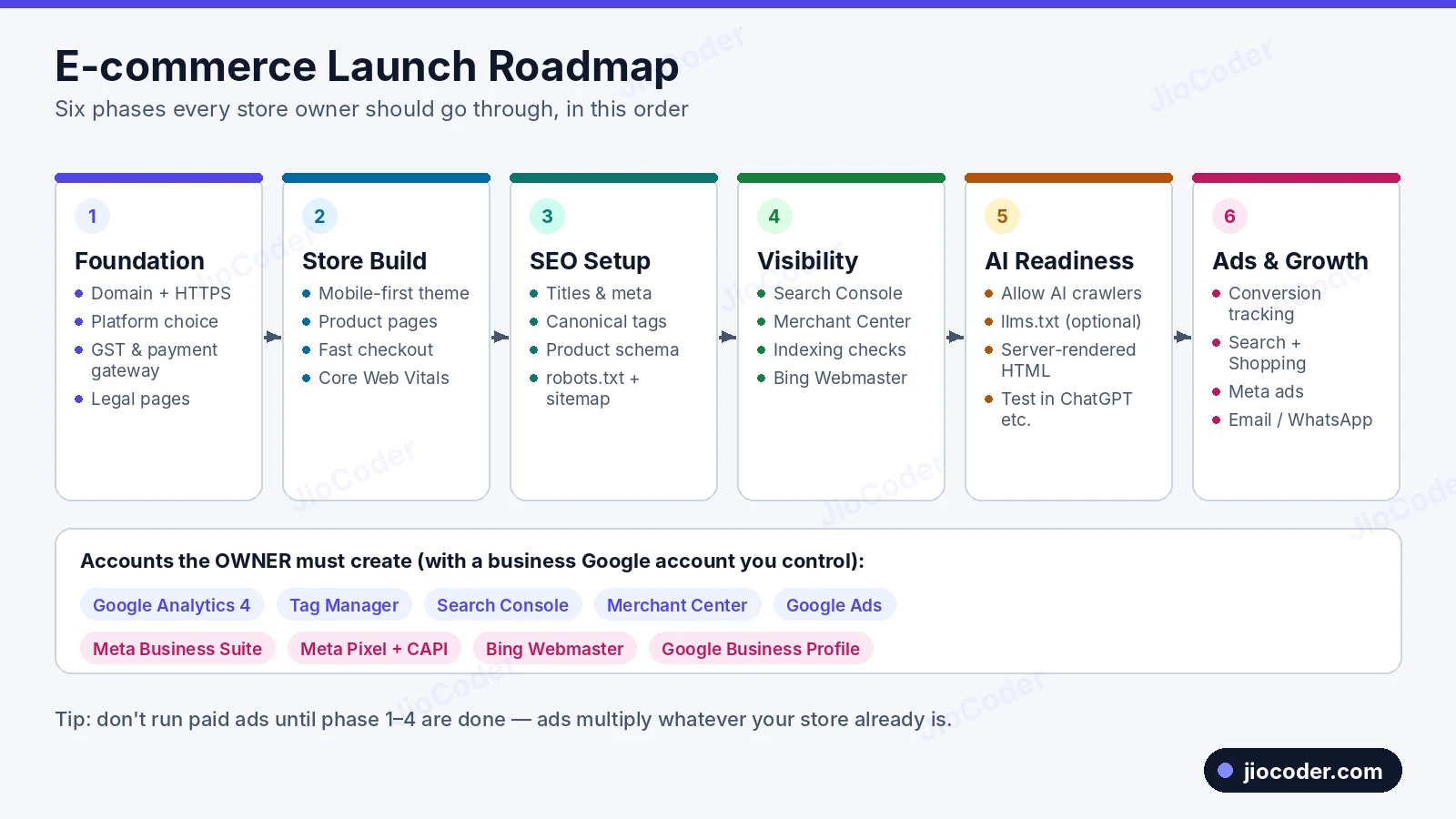
- Foundation — domain, HTTPS, platform, GST registration, payment gateway and policy pages. Without these you cannot legally take payments.
- Store build — theme, product pages, cart, checkout and speed. This decides your conversion rate — how many visitors actually buy.
- SEO setup — titles, descriptions, canonical tags, structured data, robots.txt and sitemap.
- Visibility — connect the store to Google and Bing through Search Console, Merchant Center and Bing Webmaster Tools, then confirm pages are indexed.
- AI readiness — make sure AI assistants can read and cite your store.
- Ads and growth — paid traffic plus email and WhatsApp marketing to bring customers back.
Many owners start running ads in week one. If the checkout is slow or tracking is missing, ads only multiply your losses. Finish phases 1–4 first.
2. Owner Checklist: What You Must Set Up First#
These are decisions and accounts that belong to you, the owner, not to your developer or agency. If a developer creates them on their personal account and later leaves, you can lose years of data.
2.1 Domain and HTTPS#
- Domain name — short, easy to spell and easy to say on a phone call.
.comor.inboth work well for an Indian brand. - Register it in your own name with your own email and turn on auto-renewal. An expired domain takes the whole store offline.
- HTTPS (SSL certificate) — encrypts customer data, is a Google ranking signal and is required by payment gateways. Shopify, WooCommerce hosts and Vercel give it free.
2.2 Choosing a platform#
| Platform | Good for | Trade-off |
|---|---|---|
| Shopify | Fast launch; hosting, security and updates handled for you; big app store | Monthly fee + app costs; less control over checkout |
| WooCommerce | Full control, WordPress blogging, lower base cost | You manage hosting, updates, security and speed |
| Custom / headless (Next.js + commerce API) | Unique design, top performance, complex features | Needs developers to build and maintain |
For most new stores, Shopify is the safest start. Move to a custom build later when the business needs it (see section 13).
2.3 Business, payments and shipping#
- Business registration and GST — needed for GST invoices and for most Indian payment gateways to approve you.
- Payment gateway — Razorpay, PayU, Cashfree, Stripe or PayPal with UPI, cards, net banking and wallets. Place one real test order before launch and refund it.
- Cash on Delivery (COD) — increases orders in India but also returns and fake orders. Many stores add a small COD fee or confirm COD orders on WhatsApp.
- Shipping — an aggregator (Shiprocket, Delhivery, etc.) gives you many couriers in one dashboard. Set zones, rates and a free-shipping threshold.
- Notifications — automatic order-confirmed, shipped and delivered messages by email, SMS or WhatsApp.
2.4 Legal and trust pages#
Payment gateways check for these before activating your account, and customers look for them before trusting a new store:
- Privacy Policy — what data you collect and how you use it.
- Terms & Conditions — rules for using the store and buying from it.
- Refund / Return Policy — return window, item condition, how and when refunds are paid.
- Shipping Policy — delivery times, charges, serviceable areas.
- Contact Us — business address, phone and email.
- About Us — your story; builds trust and helps search engines and AI tools understand who you are.
2.5 Accounts the owner must create#
- Google Analytics 4 (GA4) — visitor behaviour, traffic sources, purchases and revenue.
- Google Tag Manager (GTM) — one container for all tracking tags.
- Google Search Console — how your site performs in Google Search (section 6).
- Google Merchant Center — the product catalog for Shopping results and ads.
- Google Ads — to run paid campaigns.
- Google Business Profile — only if customers can visit a physical location.
- Meta Business Suite + Meta Pixel / Conversions API — for Facebook and Instagram ads. The Conversions API sends purchases from your server, which is more reliable than the browser pixel alone.
- Bing Webmaster Tools — Bing's version of Search Console; Bing's index also powers Microsoft Copilot.
Create one business Google account (for example marketing@yourbrand.com) that owns all Google tools. Give your developer or agency access as a user, never as the only owner.
3. Store Essentials: Product Pages, Speed & Checkout#
3.1 Mobile-first design#
Most Indian shoppers browse and buy on their phones. Design for small screens first: big tap targets, a sticky "Add to cart" button, readable text and no pop-ups covering the whole screen.
3.2 Speed and Core Web Vitals#
| Metric | What it measures | Good score | How to improve |
|---|---|---|---|
| LCP (Largest Contentful Paint) | How fast the main content (usually the product image) appears | Under 2.5 s | Compress images (WebP/AVIF), preload the hero image, use a CDN |
| INP (Interaction to Next Paint) | How quickly the page reacts to taps and clicks | Under 200 ms | Remove unused apps and scripts, delay third-party tags |
| CLS (Cumulative Layout Shift) | How much the layout jumps while loading | Under 0.1 | Set width/height on images, reserve space for banners |
Check them with PageSpeed Insights and the Core Web Vitals report in Search Console.
3.3 Product pages that sell#
- Several high-quality images from different angles, zoom, and ideally a short video.
- Price, discount, stock status and an estimated delivery date for the customer's pincode.
- Size chart and fit details for fashion; specifications for electronics.
- A unique description — never copied from the manufacturer or a marketplace.
- Customer reviews with photos.
- A return-policy summary next to the Add to cart button.
3.4 Checkout#
- Allow guest checkout.
- Ask for as few fields as possible; autofill city and state from the pincode.
- Show all costs (shipping, COD fee, taxes) before payment.
- Offer UPI, cards, net banking, wallets and COD.
3.5 Trust and recovery#
- Secure-payment badges, real reviews, clear policies and visible WhatsApp or chat support.
- Abandoned cart recovery by email, SMS or WhatsApp.
- A helpful 404 page with search and links to popular categories.
4. How Google Finds, Indexes & Ranks Your Store#
Every product page goes through this pipeline. If it fails at any stage, it never reaches shoppers.
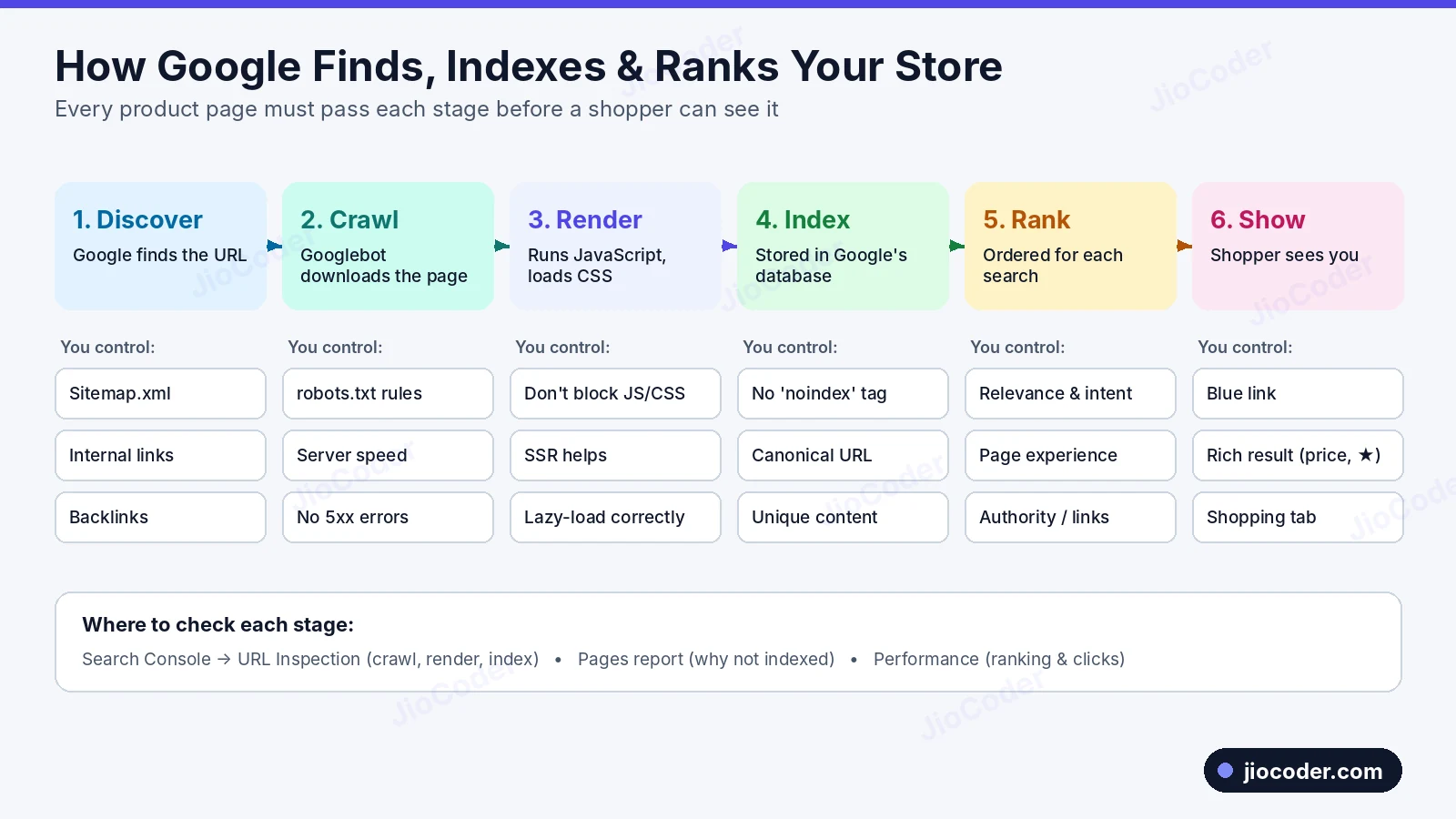
- Discover — Google learns the URL exists through your sitemap, internal links and backlinks.
- Crawl — Googlebot downloads the page after checking robots.txt. Slow servers or 5xx errors reduce crawling.
- Render — Google runs JavaScript and loads CSS. If product details appear only after heavy client-side JavaScript, or JS/CSS is blocked, Google may see an empty page. Server-side rendering (Shopify Liquid, Next.js SSR) avoids this.
- Index — Google decides whether to store the page. A
noindextag, a canonical pointing elsewhere, or thin/duplicate content can keep it out. - Rank — indexed pages are ordered by relevance, content quality, page experience and authority.
- Show — the shopper sees a blue link, a rich result with price and stars, or a product in the Shopping tab.
In Search Console, URL Inspection checks crawl, render and index; the Pages report explains exclusions; and the Performance report shows ranking and clicks.
5. SEO Checklist for E-commerce#
SEO (Search Engine Optimization) is everything you do so your pages rank higher in free search results.
5.1 Technical SEO#
- One version of the site —
http,https,wwwand non-wwwmust 301-redirect to a single version. - Clean URLs —
/products/mens-cotton-tshirt-navy, not/p?id=8823&v=2. - Canonical tags — tell Google the main URL when a product appears at several URLs:
HTML
<link rel="canonical" href="https://yourstore.com/products/mens-cotton-tshirt" /> - Faceted navigation — filter and sort parameters create near-duplicate URLs. Canonicalise them and block sort/filter parameters in robots.txt if they waste crawl budget.
- Redirects — 301-redirect deleted or renamed products to the closest product or category.
- Out-of-stock products — keep the page live if it will return; redirect it if it is gone forever.
5.2 On-page SEO#
- Title tag — about 50–60 characters, main keyword first, brand last.
- Meta description — about 150–160 characters with price, offer, shipping or returns.
- One H1 per page — the product or category name.
- Unique product descriptions — material, fit, use cases, care.
- Image alt text — "navy blue men's cotton t-shirt front view", not "IMG_2231".
- Category page content — a short intro and FAQs so the page has text to rank.
- Internal links — breadcrumbs, related products, "customers also bought".
5.3 Content and off-page SEO#
- Blog — buying guides, comparisons and how-to articles.
- Reviews — fresh, unique text on every product page.
- Backlinks — press, influencers, suppliers, industry directories. Never buy links in bulk.
5.4 Product structured data (Schema.org)#
JSON-LD structured data makes products eligible for rich results with price, availability and star ratings.
<script type="application/ld+json">
{
  "@context": "https://schema.org",
  "@type": "Product",
  "name": "Men's Cotton T-Shirt - Navy",
  "image": "https://yourstore.com/images/tshirt-navy.webp",
  "description": "100% cotton regular-fit t-shirt.",
  "sku": "TS-NAVY-M",
  "brand": { "@type": "Brand", "name": "YourBrand" },
  "offers": {
    "@type": "Offer",
    "price": "599",
    "priceCurrency": "INR",
    "availability": "https://schema.org/InStock",
    "url": "https://yourstore.com/products/mens-cotton-tshirt-navy"
  },
  "aggregateRating": {
    "@type": "AggregateRating",
    "ratingValue": "4.5",
    "reviewCount": "128"
  }
}
</script>
Also useful: BreadcrumbList, Organization and FAQPage. Test every template with Google's Rich Results Test.
Structured data must match what the shopper sees. A price or rating in the schema that is not on the page breaks Google's guidelines.
6. What is Google Search Console?#
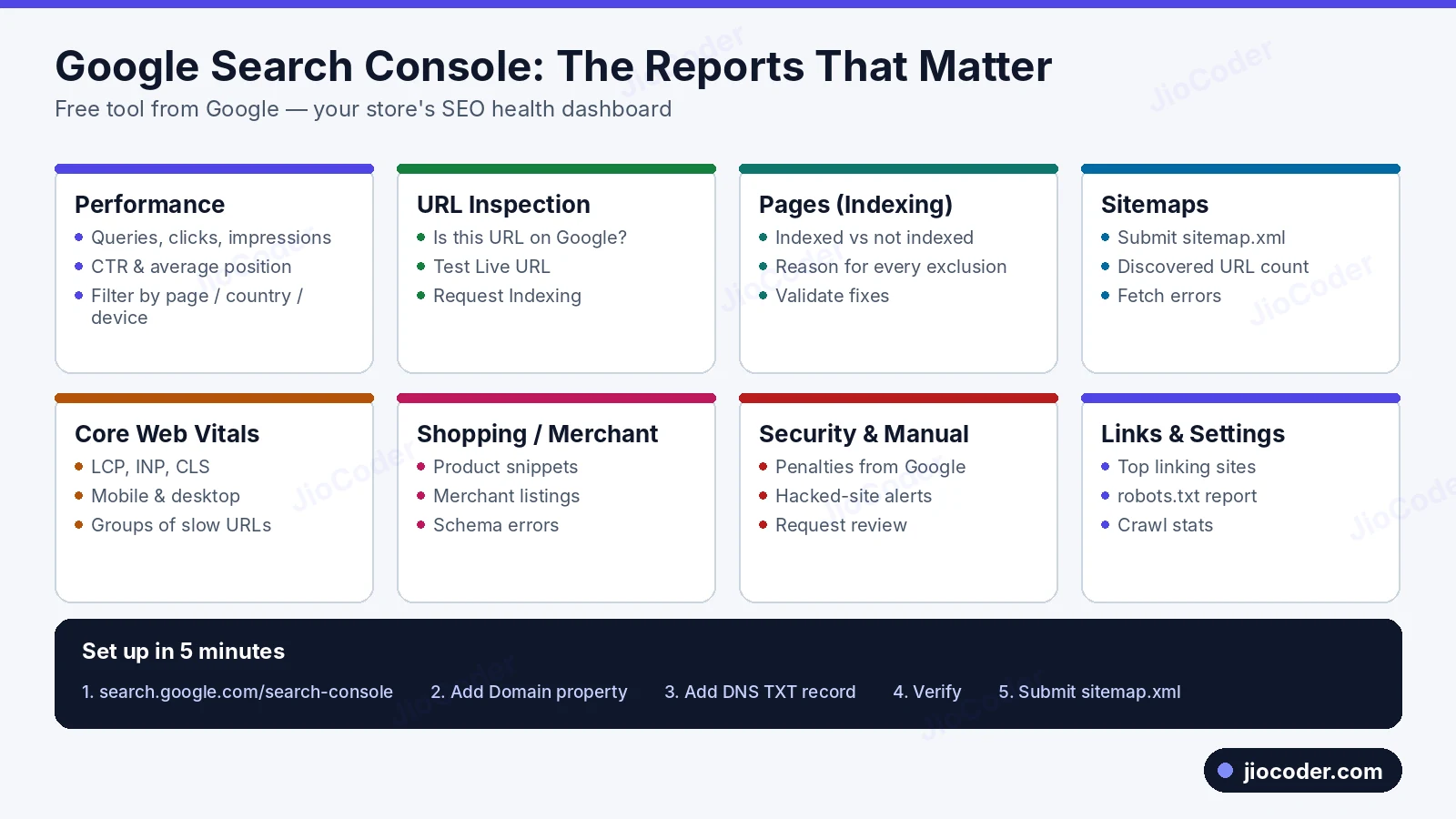
Google Search Console (GSC) is a free Google tool that shows how Google sees your website. Analytics shows what people do after they arrive; Search Console shows how they found you and whether Google can read your pages.
6.1 The reports that matter#
- Performance — queries, clicks, impressions, CTR and average position. Find products with many impressions but low CTR and rewrite their titles.
- URL Inspection — check one URL and request indexing (section 7).
- Pages (Indexing) — indexed pages and the reason each excluded page is not.
- Sitemaps — submit your sitemap and see discovered URLs.
- Core Web Vitals — good, needs-improvement and poor URL groups.
- Shopping / Merchant listings and Product snippets — product structured-data errors.
- Security issues and Manual actions — hacking alerts and penalties, plus review requests.
- Links and Settings — linking sites, the robots.txt report and crawl stats.
6.2 How to set up Search Console#
- Go to search.google.com/search-console and sign in with your business Google account.
- Choose Domain property and enter
yourstore.com. It covers every version and subdomain at once. - Add the TXT record Google gives you in your domain's DNS settings.
- Click Verify (DNS can take minutes to hours).
- Submit
https://yourstore.com/sitemap.xmlunder Sitemaps. - Add team members under Settings → Users and permissions with the lowest access they need.
7. How to Check if a Particular URL is Indexed#
Method 1: URL Inspection tool (most reliable)#
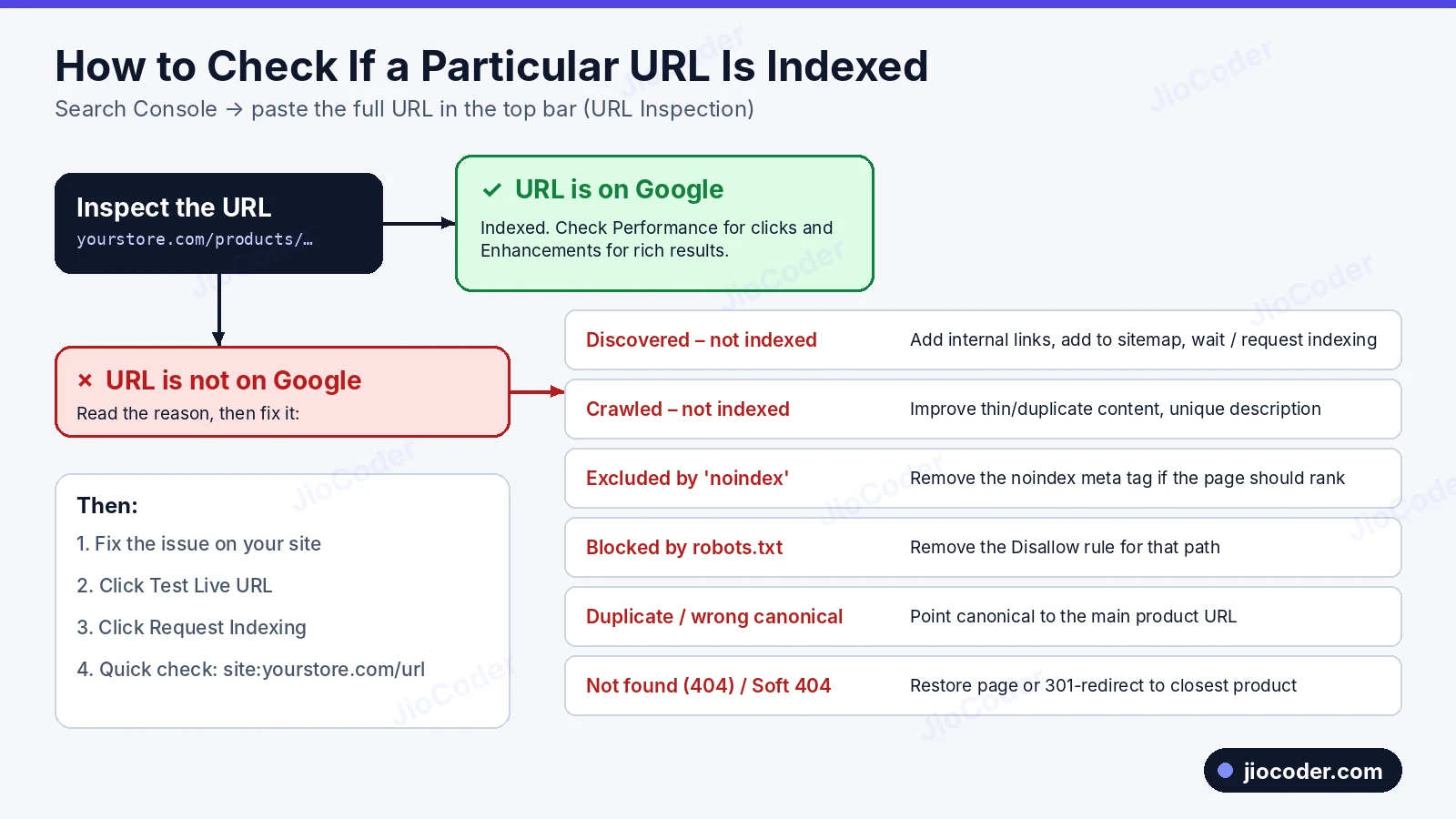
- Paste the full URL into the search bar at the top of Search Console.
- "URL is on Google" means indexed; "URL is not on Google" shows the reason.
- Test Live URL checks the page as it is now; View Tested Page shows the rendered HTML and screenshot.
- Request Indexing puts a ready page in the priority queue (daily limit; not a guarantee).
Method 2: The site: operator (quick check)#
site:yourstore.com/products/mens-cotton-tshirtIf the page appears, it is indexed. Counts from site: are estimates; confirm in Search Console.
Method 3: The Pages (indexing) report#
| Status | What it means | How to fix |
|---|---|---|
| Discovered – currently not indexed | Known but not crawled yet | Add internal links, keep in sitemap, improve speed, request indexing |
| Crawled – currently not indexed | Read but not valuable enough yet | Make content unique and useful |
| Excluded by 'noindex' tag | Page asks not to be indexed | Remove noindex if it should rank |
| Blocked by robots.txt | Crawling not allowed | Remove the matching Disallow rule |
| Alternate page with proper canonical tag | The canonical version is indexed instead | Usually fine |
| Duplicate without user-selected canonical | Google chose its own main URL | Add correct canonical tags |
| Not found (404) / Soft 404 | Missing or empty-looking page | Restore or 301-redirect |
| Page with redirect | The URL redirects | Fine if intended; remove from sitemap |
After fixing a group of pages, click Validate fix in that report.
8. How to Check Product Visibility on Google#
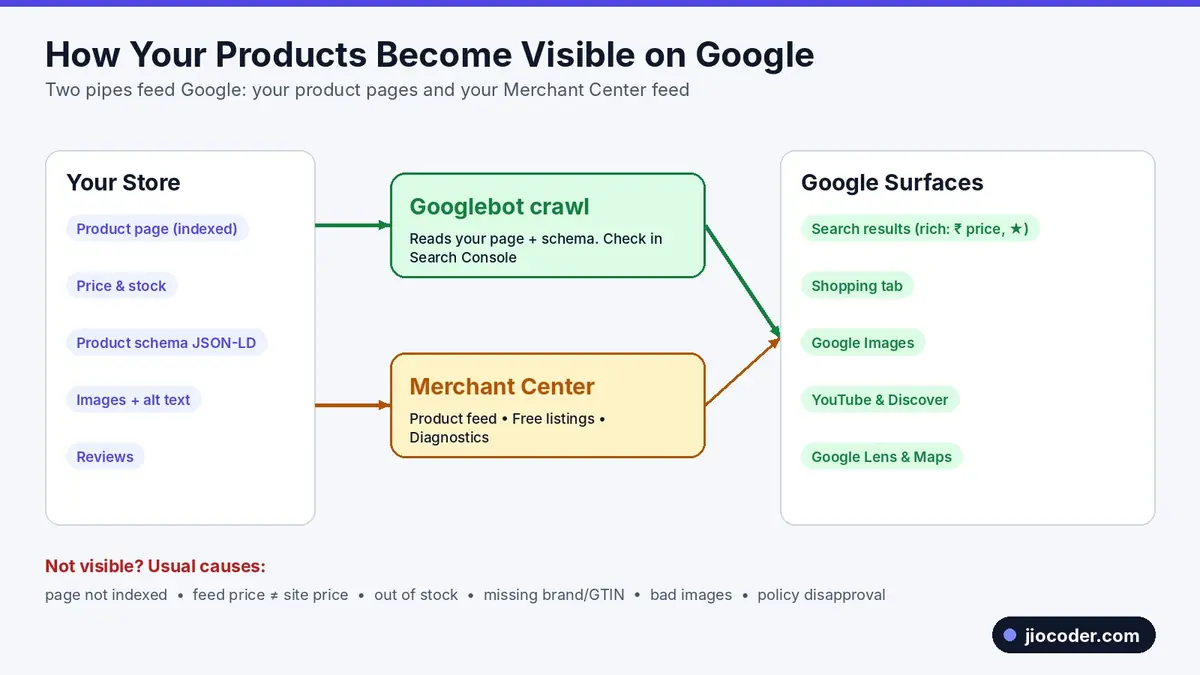
Products reach Google through two pipes, and the best stores use both:
- Your product pages, crawled by Googlebot. With good structured data they can appear as rich results. You monitor this in Search Console.
- Your product feed in Google Merchant Center — title, price, availability, image, brand and GTIN for every product. This feeds the Shopping tab, free listings, Google Images, YouTube and Shopping ads.
8.1 Setting up Merchant Center#
- Create an account and verify your website.
- Add business information, shipping and return policies.
- Connect your product feed (Shopify's Google & YouTube app and WooCommerce plugins sync it automatically).
- Make sure free listings are on.
8.2 How to check visibility#
- Merchant Center → Products — approved, limited and disapproved products with the issue for each.
- Search Console → Shopping reports — product snippet and merchant listing errors.
- Search Console → Performance — filter by "Search appearance" for product rich results.
- Manual check — search the product name in Incognito and open the Shopping tab.
- Rich Results Test — confirm Google reads price, availability and rating.
8.3 Why products are not visible#
- The product page is not indexed (section 7).
- Price or stock mismatch between feed and page — the most common disapproval.
- Missing brand or GTIN.
- Product images with watermarks, promo text or borders.
- Missing shipping or return policy.
- Policy violations.
9. robots.txt and sitemap.xml Explained#
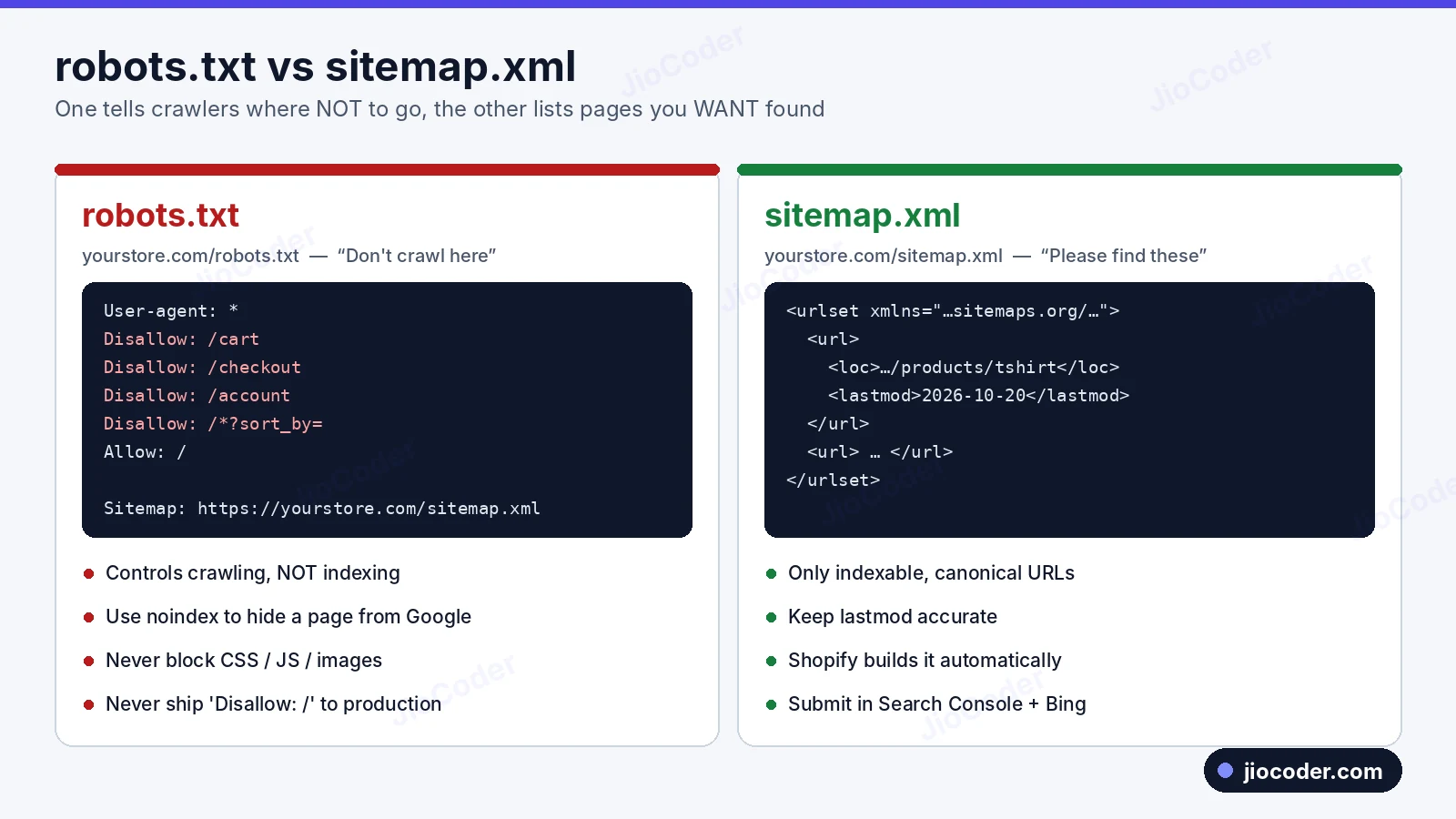
robots.txt tells crawlers where not to go. sitemap.xml lists the pages you want found.
9.1 What is robots.txt?#
A plain text file at https://yourstore.com/robots.txt that well-behaved bots read before crawling.
User-agent: *
Disallow: /cart
Disallow: /checkout
Disallow: /account
Disallow: /search
Disallow: /*?sort_by=
Disallow: /*?filter=
Allow: /

Sitemap: https://yourstore.com/sitemap.xml
User-agent: *— rules apply to all bots (or target one, likeGooglebot).Disallow: /cart,/checkout,/account— private pages with no search value.Disallow: /search— internal search creates endless low-quality URLs.Disallow: /*?sort_by=— wildcard blocks sort parameters to save crawl budget.Sitemap:— tells every crawler where your sitemap is.
9.2 robots.txt rules you must know#
- robots.txt controls crawling, not indexing. To keep a page out of Google, use
<meta name="robots" content="noindex">and do not block it, or Google never sees the tag. - Never block CSS, JavaScript or product images.
- Never ship
Disallow: /to production from a staging site. - It is public — never use it to hide secret URLs.
- Check it in Search Console → Settings → robots.txt.
- Shopify generates a default; customise it with a
robots.txt.liquidtemplate.
9.3 What is a sitemap?#
A sitemap lists your important URLs with their last-modified date so search engines discover new products quickly.
<?xml version="1.0" encoding="UTF-8"?>
<urlset xmlns="http://www.sitemaps.org/schemas/sitemap/0.9">
  <url>
    <loc>https://yourstore.com/products/mens-cotton-tshirt</loc>
    <lastmod>2026-10-20</lastmod>
  </url>
  <url>
    <loc>https://yourstore.com/collections/t-shirts</loc>
    <lastmod>2026-10-18</lastmod>
  </url>
</urlset>
Large stores use a sitemap index linking to separate sitemaps for products, collections, pages and blogs. One sitemap holds up to 50,000 URLs. Shopify creates this automatically at /sitemap.xml.
9.4 Sitemap checklist#
- Only indexable pages — no cart, checkout, login, redirected or noindex pages.
- Final HTTPS canonical URLs with honest
lastmoddates. - Add the sitemap line to robots.txt.
- Submit it in Search Console and Bing Webmaster Tools, and check for errors after big changes.
10. How to Know if LLMs (AI Tools) Can See Your Website#
Shoppers increasingly ask AI assistants things like "best cotton t-shirt brands in India under ₹800". Being mentioned and cited there is called GEO (Generative Engine Optimization). It builds on normal SEO with a few extra checks.
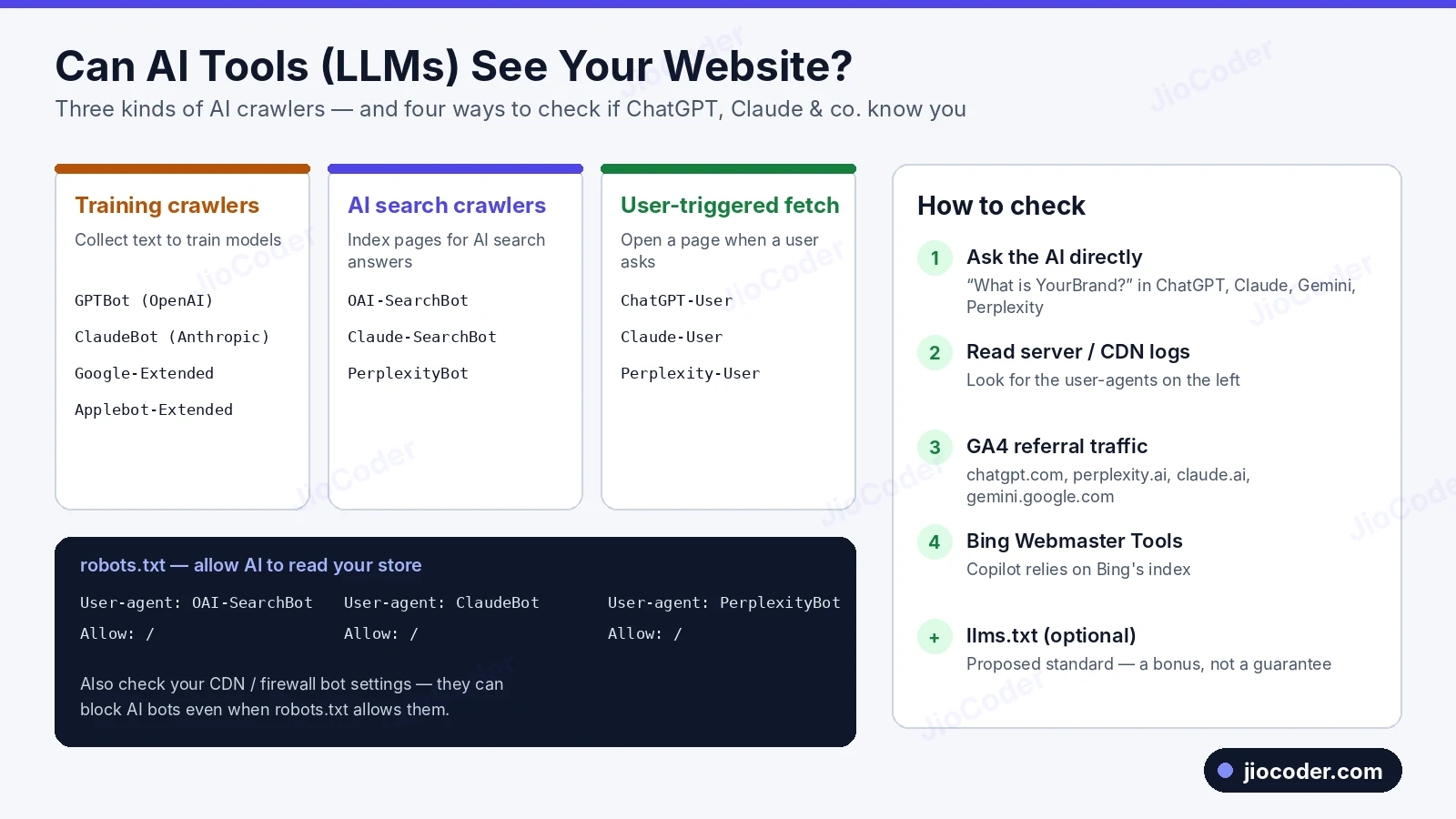
10.1 The three kinds of AI crawlers#
| Type | What it does | Examples |
|---|---|---|
| Training crawlers | Collect public text that may train future models | GPTBot, ClaudeBot, Google-Extended, Applebot-Extended |
| AI search crawlers | Index pages so AI search can cite them | OAI-SearchBot, Claude-SearchBot, PerplexityBot |
| User-triggered fetchers | Open a page live when a user asks about it | ChatGPT-User, Claude-User, Perplexity-User |
Google-Extended only controls whether content is used for Gemini models; it does not affect normal Google Search ranking.
10.2 Step 1 — Check robots.txt and your firewall#
User-agent: GPTBot
Allow: /

User-agent: OAI-SearchBot
Allow: /

User-agent: ClaudeBot
Allow: /

User-agent: PerplexityBot
Allow: /
Some brands block training crawlers but allow search and user crawlers so they still get cited. Make that choice on purpose, and re-check vendor docs every few months because crawler names change. Also check your CDN or firewall bot settings — they can block AI bots even when robots.txt allows them.
10.3 Step 2 — Add llms.txt (optional)#
llms.txt is a proposed standard: a Markdown file at /llms.txt summarising your site and linking key pages. Major AI companies have not confirmed they rely on it, so treat it as a cheap bonus.
# YourBrand
> Indian clothing brand selling 100% cotton t-shirts, polos and innerwear.

## Key pages
- [Men's T-Shirts](https://yourstore.com/collections/mens-tshirts)
- [Size Guide](https://yourstore.com/pages/size-guide)
- [Shipping Policy](https://yourstore.com/policies/shipping-policy)
- [Return Policy](https://yourstore.com/policies/refund-policy)
10.4 Step 3 — Check whether AI tools actually know you#
- Ask the assistants directly in ChatGPT, Claude, Gemini and Perplexity: "What is YourBrand?", "Best [your product] brands in India". Note whether you are mentioned, cited and described correctly. Repeat monthly.
- Check server or CDN logs for the user-agents above.
- Check GA4 referral traffic (Reports → Acquisition → Traffic acquisition) for
chatgpt.com,perplexity.ai,claude.ai,gemini.google.comandcopilot.microsoft.com. - Check Bing Webmaster Tools — Copilot relies on Bing's index.
10.5 Step 4 — Make content easy for AI to understand#
- Clear, factual answers in short paragraphs and lists: FAQs, size guides, materials, comparisons.
- Structured data for price, stock, brand and ratings.
- Important content in the server-sent HTML — many AI crawlers do not run JavaScript.
- Consistent brand details across your site, Google Business Profile, marketplaces and social profiles.
- Mentions on trusted sites (reviews, press, comparison articles).
11. How to Run Ads & How Many Types of Ads There Are#
11.1 Before you spend a single rupee#
- Set up conversion tracking for
purchase(with order value),add_to_cartandbegin_checkoutusing GTM, GA4, the Google Ads tag and Meta Pixel + Conversions API. - Test it with a real order in GA4 DebugView, Google Ads and Meta Events Manager.
- Link accounts — Google Ads ↔ GA4 ↔ Merchant Center.
- Prepare landing pages that load fast and match the ad's offer.
- Set a budget and a target based on your profit margin.
11.2 Google Ads campaign types#
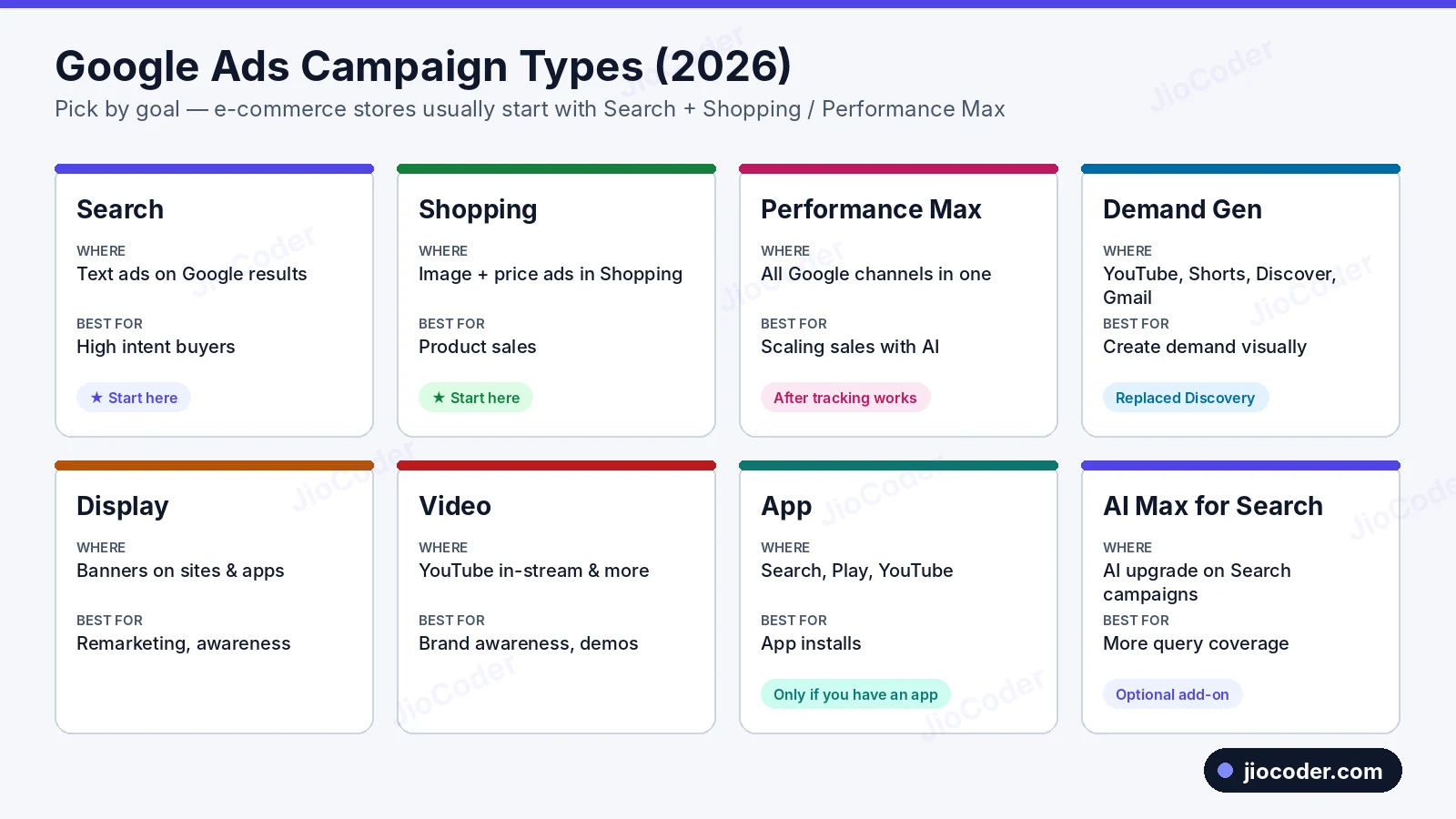
- Search — text ads on Google results for keywords. Highest intent; pay per click.
- Shopping — product ads with image, title, price and store name, driven by your Merchant Center feed.
- Performance Max (PMax) — one campaign across Search, Shopping, YouTube, Display, Gmail, Discover and Maps; Google's AI picks placements and bids. Best once you have conversion data.
- Demand Gen — visual ads on YouTube (including Shorts), Discover and Gmail. Replaced Discovery campaigns.
- Display — banners across Google's network; mainly for remarketing.
- Video — YouTube ads for awareness and demos.
- App — promotes a mobile app; only if you have one.
- AI Max for Search — an optional AI upgrade inside Search campaigns.
Google also has Smart campaigns (simplified, for very small businesses) and Local Services Ads (for service businesses, not usually e-commerce).
1) A Search campaign on your brand name plus top product keywords. 2) A Shopping campaign once Merchant Center products are approved. 3) Performance Max after you have steady conversions and good creatives.
11.3 Meta (Facebook & Instagram) ads#
- Formats — single image, video, carousel, collection, Stories and Reels.
- Advantage+ shopping campaigns — Meta's automated sales campaigns.
- Catalog / dynamic product ads — show people the exact products they viewed or added to cart.
- What works — short UGC-style videos, clear offers, and testing several creatives at once.
11.4 Other ad channels#
- Marketplace ads on Amazon, Flipkart or Myntra if you sell there.
- Pinterest, Snapchat, LinkedIn — depending on your audience.
- Influencer and affiliate marketing.
- Email, SMS and WhatsApp — the cheapest way to bring past customers back.
11.5 Which ads to run at each stage#
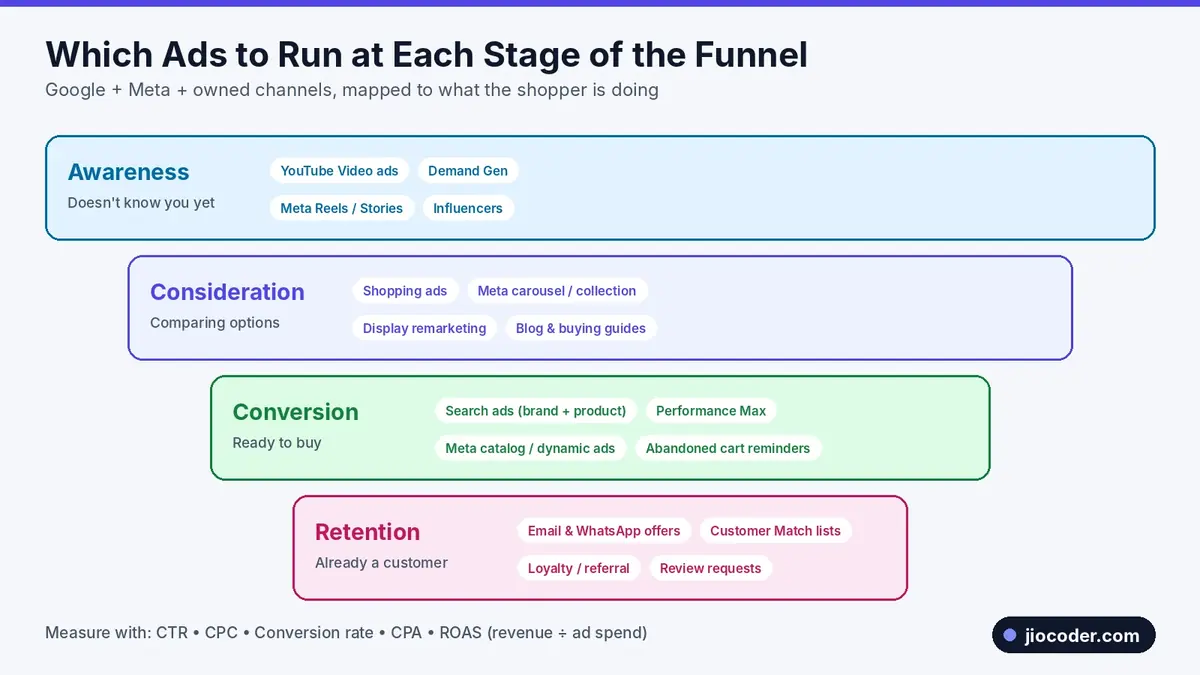
- Awareness — YouTube video ads, Demand Gen, Meta Reels and Stories, influencers.
- Consideration — Shopping ads, Meta carousel and collection ads, Display remarketing, blog buying guides.
- Conversion — Search ads on brand and product keywords, Performance Max, Meta catalog ads, abandoned cart reminders.
- Retention — email and WhatsApp offers, Customer Match lists, loyalty and referral programs, review requests.
11.6 Step by step: your first Google Search campaign#
- Create a Google Ads account with your business Google account; link GA4 and Merchant Center.
- New campaign → goal Sales → type Search.
- Choose locations you deliver to, language and a daily budget.
- Start with Maximize conversions; try Target ROAS once you have roughly 30+ conversions a month.
- Create themed ad groups with closely related keywords.
- Write responsive search ads (up to 15 headlines, 4 descriptions) with product, offer, shipping and returns.
- Add assets: sitelinks, callouts ("COD available"), price and image assets.
- Add negative keywords: "free", "second hand", "wholesale", "jobs".
- Review the search terms report weekly.
11.7 Key ad metrics#
| Metric | Formula | What it tells you |
|---|---|---|
| CTR | Clicks ÷ Impressions | Is the ad attractive and relevant? |
| CPC | Cost ÷ Clicks | Cost per visitor |
| Conversion rate | Orders ÷ Clicks | Is the store convincing? |
| CPA | Cost ÷ Orders | Cost per order |
| ROAS | Revenue ÷ Ad spend | ₹4 revenue per ₹1 spent = 4x ROAS |
Break-even ROAS = 1 ÷ profit margin. At a 40% margin, break-even ROAS is 2.5x; anything below that loses money.
12. Final E-commerce Launch Checklist#
Business#
- ☐ Domain in the owner's name, auto-renew on, HTTPS working
- ☐ Payment gateway live and tested with a real order and refund
- ☐ Shipping partner, zones, rates and COD rules configured
- ☐ Privacy, Terms, Refund, Shipping, Contact and About pages published
- ☐ Order, shipping and delivery notifications working
Store#
- ☐ Tested on real Android and iPhone devices
- ☐ PageSpeed Insights and Core Web Vitals checked
- ☐ Every product has a unique title, description, images and alt text
- ☐ Search, filters, cart and checkout tested end to end
- ☐ Abandoned cart recovery and a custom 404 page
SEO#
- ☐ Search Console verified as a Domain property
- ☐ sitemap.xml submitted with no errors
- ☐ robots.txt reviewed — no accidental
Disallow: / - ☐ Canonical tags on variants and filtered pages
- ☐ Product, Breadcrumb and Organization structured data passing the Rich Results Test
- ☐ Homepage, top categories and top products indexed
- ☐ Bing Webmaster Tools set up
Product visibility and AI#
- ☐ Merchant Center verified, feed approved, free listings on
- ☐ AI crawlers allowed or blocked on purpose, firewall checked
- ☐ llms.txt added (optional)
- ☐ Brand tested in ChatGPT, Claude, Perplexity and Gemini
Tracking and ads#
- ☐ GA4 + GTM installed, purchase event with order value verified
- ☐ Google Ads conversion tag and Meta Pixel + Conversions API working
- ☐ Break-even ROAS calculated
- ☐ First Search + Shopping campaigns ready with negative keywords
- ☐ Remarketing audiences created
13. Build It Yourself: Master Prompt for Next.js + MongoDB#
If you are a developer building a custom store instead of using Shopify, you can hand an AI coding agent (Claude Code, Cursor, etc.) a single detailed spec. Below is a condensed version of the master prompt. It covers the storefront, checkout, payments, returns, security, performance and the admin panel, and tells the agent to build in phases instead of all at once.
# Build a production-ready D2C e-commerce store
Role: senior full-stack engineer. Brand: {{BRAND}}. Market: India (INR, GST, UPI/COD).

## Stack (fixed)
- Next.js (App Router, TypeScript strict) for frontend AND backend (Route Handlers + Server Actions)
- MongoDB + Mongoose; money stored as integers in paise
- Zod validation, Auth.js (email+password, Google), Tailwind, Zustand
- Razorpay + COD behind a PaymentProvider interface
- Cloudinary/S3 images, Resend email, Atlas Search, Upstash Redis rate limiting
- Vitest + Playwright, GitHub Actions, deploy on Vercel + Atlas

## Storefront
Header (mega menu, sticky, search, cart/wishlist counts), footer (menus, newsletter,
policies, GSTIN), banner slider (first slide = LCP, priority image), reusable product grid,
trending grid (hourly trendingScore job), collection grid with URL-based filters
(price, size, colour, brand, rating, stock) and sorting (featured, best selling, newest,
price, rating, discount), product page (gallery, variants, pincode check, A+ content,
reviews, Product JSON-LD), FAQ, blogs, About, Contact (rate-limited + captcha),
Privacy, Terms, Return policy, cookie consent.

## Commerce flows
Auth (signup, email verification, login, Google, forgot/reset with hashed one-time
tokens, lockout), cart drawer (server-priced, optimistic UI, free-shipping bar, coupons),
wishlist, add-to-cart flow with stock checks, single-page checkout with idempotency key,
Razorpay signature + webhook verification, stock reservation, thank-you page,
order state machine (pending_payment -> confirmed -> processing -> packed -> shipped
-> out_for_delivery -> delivered, plus cancelled/returned/refunded), pre-orders,
return/exchange flow with photos and QC, GST invoice PDF.

## Non-functional
- Rate limits per endpoint (login, signup, reset, search, cart, checkout, contact)
- Security: Zod everywhere, NoSQL-injection guards, sanitised HTML, CSP and security
  headers, RBAC, IDOR checks, admin 2FA, audit log, encrypted bank details
- Performance budgets: LCP < 2.5s, INP < 200ms, CLS < 0.1, FCP < 1.8s,
  Lighthouse mobile >= 90, Lighthouse CI in GitHub Actions
- SEO: generateMetadata, sitemap.ts, robots.ts (configurable AI crawler rules),
  JSON-LD, Merchant Center feed, redirects manager

## Admin panel (/admin)
Dashboard KPIs, products + variant matrix + CSV import, inventory, collections,
orders (status changes, AWB, refunds, invoices), returns, customers, staff roles and
permissions, coupons, banners, CMS pages, FAQs, blogs, reviews, settings, reports,
audit log.

## How to work
Build in 10 phases: foundation -> auth -> catalog -> cart -> checkout/payments
-> post-order -> content -> admin -> SEO/analytics -> hardening.
Plan each phase first, then implement, then run lint, typecheck, tests and build.
Keep all prices and totals server-side. Start with Phase 1.Fill in your brand details (name, colours, return window, GSTIN, free-shipping threshold) before giving the prompt to the agent, and review each phase before letting it continue.
14. FAQs#
How long does it take for Google to index a new store?#
Usually a few days to a few weeks. A submitted sitemap, indexing requests for key pages, strong internal linking and a few quality backlinks speed it up.
Is Search Console the same as Google Analytics?#
No. Search Console shows performance in Google Search; Google Analytics shows what visitors do on your site. You need both.
Does robots.txt remove a page from Google?#
No. It only stops crawling. Use a noindex tag and leave the page crawlable so Google can see it.
Does blocking GPTBot hurt my Google ranking?#
No. Google Search ranking depends on Googlebot. Blocking Google-Extended also does not affect normal Google Search.
Should I start with SEO or ads?#
Both. SEO builds free traffic over months; ads bring sales from day one and show which products and keywords convert.
How much should I spend on ads at the start?#
A small daily test budget you can afford for 2–4 weeks while campaigns learn. Scale only campaigns that beat your break-even ROAS.
Should I use Shopify or build with Next.js?#
Start on Shopify if you want to launch fast with a small team. Build custom (section 13) when you need unique features, full control or top-tier performance and have developers to maintain it.
Key takeaways#
- Follow the six phases in order: foundation, store, SEO, visibility, AI readiness, then ads.
- The owner should create and control every Google, Meta and Bing account.
- A page must be discovered, crawled, rendered and indexed before it can rank — URL Inspection checks all of these.
- robots.txt blocks crawling, a noindex tag blocks indexing, and the sitemap lists what you want found.
- Use both pipes for product visibility: structured data on product pages and an approved Merchant Center feed.
- Check AI visibility through robots.txt and firewall rules, asking the assistants, and AI referral traffic in GA4.
- Set up conversion tracking before ads; start with Search + Shopping, then add Performance Max and Meta.