Can AI Build a Website in 60 Seconds?
AI can build a website draft in about 60 seconds. See what those seconds produce, what the draft misses, and how to turn it into a site you can ship.
Type one sentence, wait a minute, and an AI tool hands you a website with a hero section, a menu and a contact form. It looks finished. But is it actually a website you can put in front of real customers? Let's break down what really happens in those 60 seconds, what you get, what you don't, and how to turn that first draft into something you can ship.
The short answer#
Yes, AI can build a website in about 60 seconds — but what you get is a first draft, not a finished product. In a minute, today's AI tools can produce a good-looking, working page with layout, styling and placeholder text. What they usually can't do in that minute is make the site accessible, fast, secure, search-friendly and filled with your real content. That part still takes a person who understands the web.
Think of it like a very fast intern: brilliant at producing a first version, but you still need to check every line before it goes live.
What actually happens in those 60 seconds#
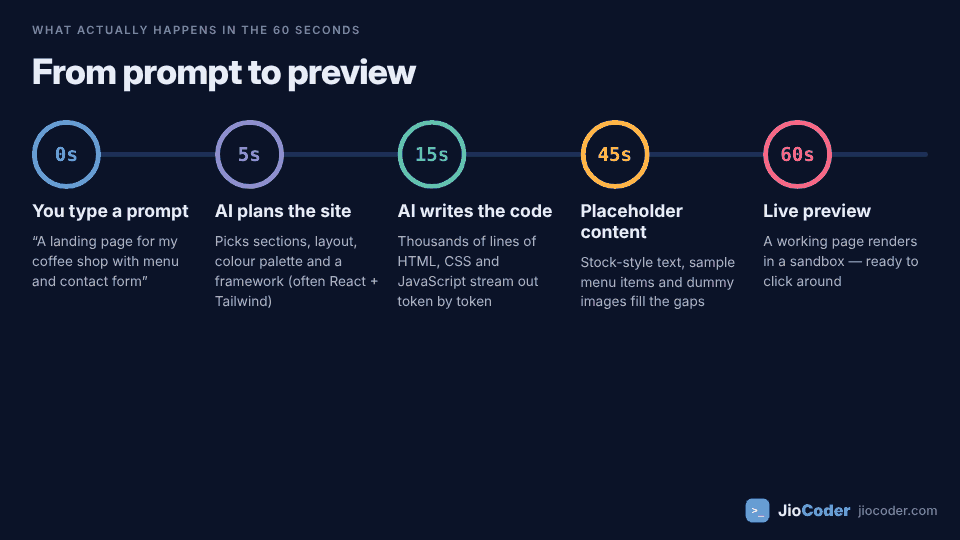
When you press Enter, the tool runs through roughly five stages:
- 0s — You write a prompt. Something like “a landing page for my coffee shop with a menu and a contact form”.
- ~5s — The AI plans the site. A large language model (LLM) decides which sections a coffee-shop page usually has, picks a layout and colour palette, and chooses a tech stack. Many tools default to
ReactwithTailwind CSS. - ~15s — It writes the code. The model generates HTML, CSS and JavaScript token by token — it predicts the next piece of code again and again, very fast. A simple landing page can be a few hundred to a few thousand lines.
- ~45s — It fills the gaps. It doesn't know your real menu, prices or photos, so it invents believable placeholder text and drops in sample images.
- ~60s — Live preview. The code runs in a sandbox in your browser so you can click around immediately.
The AI has seen millions of websites during training. A “coffee shop landing page” is a very common pattern, so the model can reproduce a solid version of it almost instantly. The more unusual your idea, the more the first draft will need fixing.
Let's look at what you actually get#
Here is the kind of prompt most people type:
Build a landing page for "Brew & Bean", a coffee shop in Pune.
Include a hero section, our menu, opening hours and a contact form.
And here is a typical snippet of what comes back. It looks fine in the preview:
<div class="menu-item" onclick="addToOrder('latte')">
  <img src="https://placehold.co/300x200">
  <span>Latte — ₹180</span>
</div>

<form>
  <input type="text" placeholder="Your name">
  <input type="text" placeholder="Email">
  <div class="btn" onclick="submitForm()">Send</div>
</form>
Spot the problems? Each one is invisible in a quick preview:
- Clickable
divs — keyboard users can't reach or press them. They should be<button>elements. - No
alttext on the image, so screen readers announce nothing useful. - No
<label>s — placeholder text disappears as soon as you type and isn't a proper label. type="text"for email — no email keyboard on phones and no basic validation.- The form doesn't send anywhere.
submitForm()often just shows a “Thank you!” message. - Placeholder image and made-up prices that you must replace.
A corrected version takes a developer a couple of minutes:
<button type="button" class="menu-item" onclick="addToOrder('latte')">
  <img src="/images/latte.webp" alt="Latte with leaf art in a white cup" width="300" height="200" loading="lazy">
  <span>Latte — ₹180</span>
</button>

<form action="/api/contact" method="post">
  <label for="name">Your name</label>
  <input id="name" name="name" type="text" autocomplete="name" required>

  <label for="email">Email</label>
  <input id="email" name="email" type="email" autocomplete="email" required>

  <button type="submit">Send</button>
</form>
That's the pattern in a nutshell: AI gets you 80% of the look in seconds, and the remaining 20% — the part that makes it work for real people — needs a human.
The 60-second iceberg: what AI usually leaves out#
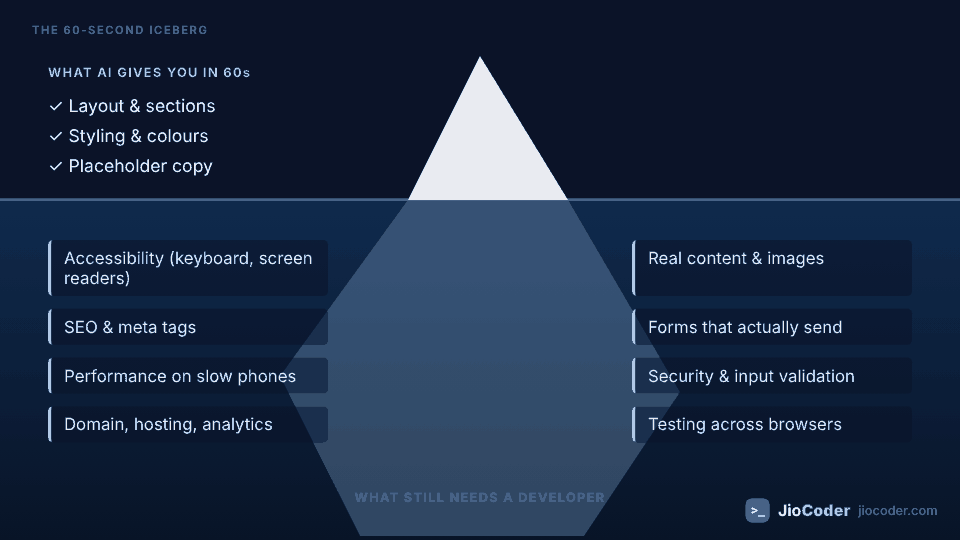
The preview shows you the tip of the iceberg. Underneath is everything that separates a demo from a real website:
1. Accessibility#
Can someone using only a keyboard, or a screen reader, use your site? AI-generated code often uses divs instead of buttons, skips labels and alt text, and picks low-contrast colours. The WCAG guidelines from the W3C are the standard to check against, and in many countries accessibility is also a legal requirement.
2. Real content and images#
The AI invents your text. Your real menu, prices, story and photos have to come from you — and real content often breaks a layout that looked perfect with short placeholder text.
3. SEO and meta tags#
A good page title, meta description, Open Graph image for social sharing, proper heading order (h1 → h2 → h3) and a sitemap are frequently missing or generic.
4. Forms that actually work#
A contact form needs somewhere to send the data — an email service, a database or an API — plus spam protection and server-side validation.
5. Performance#
Large unoptimised images, heavy JavaScript bundles and web fonts loaded in the wrong way make a site slow on mid-range phones and patchy mobile data — which is exactly how most of your visitors in India will open it.
6. Security#
Anything that accepts user input needs validation and escaping. Prompt-to-app tools that also generate a database and login can make mistakes such as exposing API keys in front-end code or leaving data readable without proper access rules.
7. Domain, hosting and analytics#
Connecting your own domain, setting up HTTPS, adding analytics and a privacy-friendly cookie notice are still separate steps.
8. Testing#
Does it work on Safari on an iPhone? On a small Android screen? With a slow 3G connection? Someone has to check.
Does fast mean usable? One recent test#
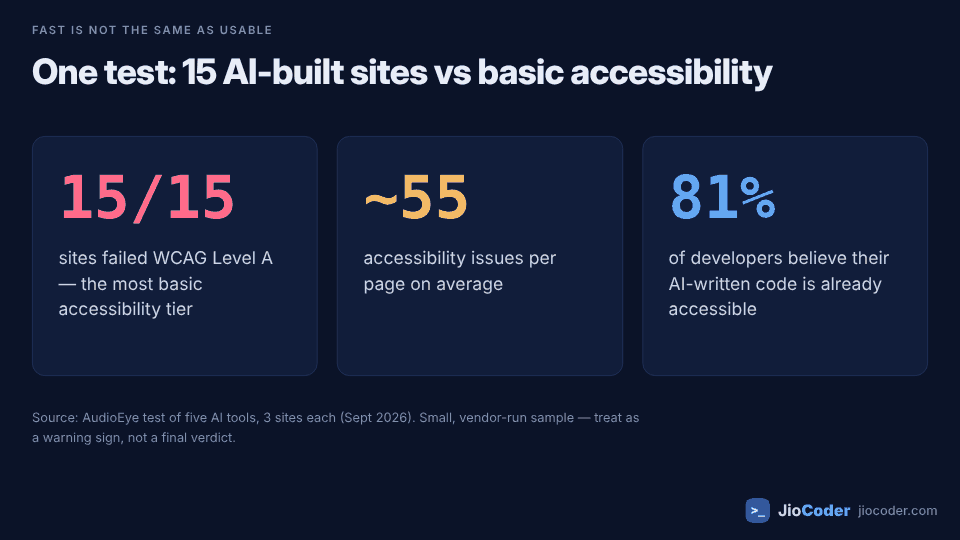
In September 2026, the accessibility company AudioEye asked five AI tools to build three websites each — 15 sites in total — with an explicit instruction to meet the WCAG AA accessibility standard. According to their write-up on VentureBeat:
- All 15 sites failed WCAG Level A, the most basic tier.
- The sites averaged around 55 accessibility issues per page.
- Their survey found 81% of developers believe their AI-generated code already meets accessibility standards.
This was a small test run by a company that sells accessibility tools (the article is sponsored by AudioEye), so treat it as a warning sign rather than a final verdict. But it matches what many developers see day to day: AI follows your instructions about how a site should look much better than your instructions about how it should work.
Not all “AI website builders” are the same#
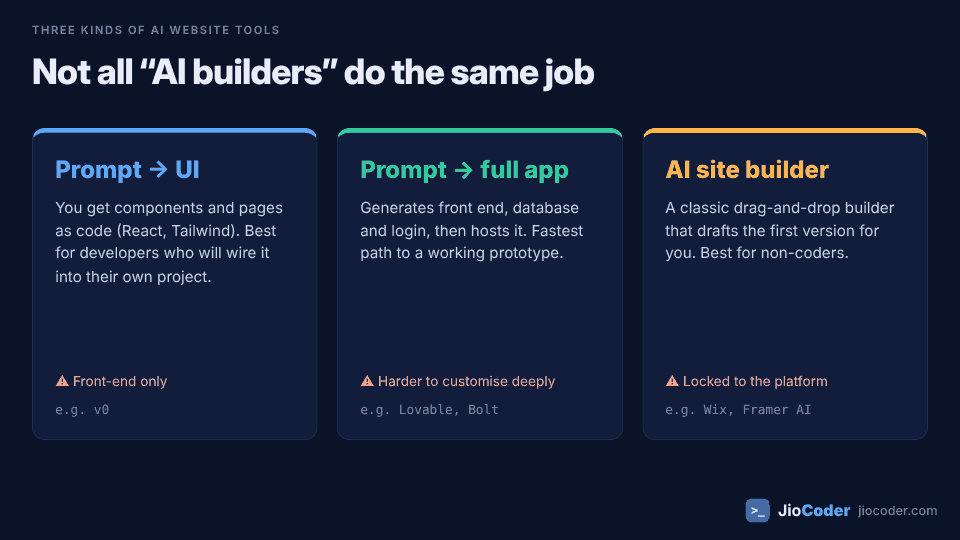
“AI builds a website” can mean three quite different things. Picking the right kind of tool matters more than picking a brand:
| Type | What you get | Best for | Watch out for | Examples |
|---|---|---|---|---|
| Prompt → UI | Components and pages as code (often React + Tailwind) you copy into your own project | Developers who already have a project | Front-end only — no database or backend | v0 |
| Prompt → full app | Front end, database, login and hosting from one prompt | Quick prototypes and MVPs | Harder to customise deeply; check security and code ownership | Lovable, Bolt |
| AI site builder | A drag-and-drop site whose first draft is written by AI | Shop owners, portfolios, non-coders | Locked to that platform; limited custom code | Wix, Framer AI |
Features and prices of these tools change every few months. Before choosing, check whether you can export the code and use your own domain — those two answers decide how stuck you'll be later.
How to write a prompt that gets a better first draft#
You can't get a production site in 60 seconds, but you can make the first draft much closer to one. Be specific about how it should work, not just how it should look:
Build a single-page site for "Brew & Bean", a coffee shop in Pune.

Sections: hero, menu (use the items below), opening hours, location map link, contact form.
Tech: plain HTML + CSS, no framework. Mobile-first.

Requirements:
- Semantic HTML: header, nav, main, section, footer; one h1.
- Every interactive element must be a real <button> or <a>.
- Every input has a visible <label>; email uses type="email".
- All images need descriptive alt text, width/height and loading="lazy".
- Colour contrast must meet WCAG AA.
- Add a page title and meta description for SEO.
- The contact form posts to /api/contact.

Menu:
Latte — ₹180, Cappuccino — ₹170, Cold Brew — ₹200, Masala Chai — ₹90
This won't fix everything, but listing requirements explicitly — semantic HTML, labels, real buttons, contrast — noticeably reduces the clean-up work.
A realistic workflow: 60 seconds to draft, about an hour to ship#
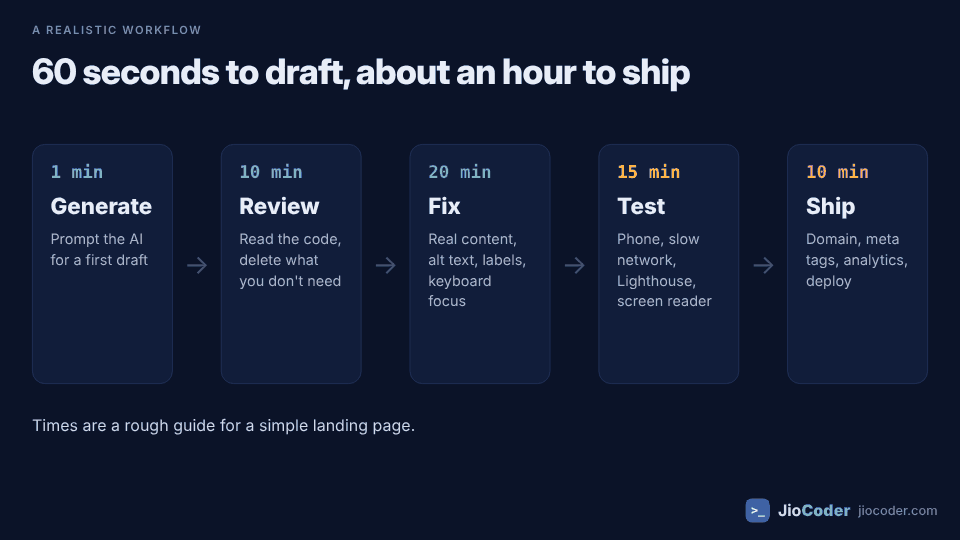
For a simple landing page, here's a practical way to use AI without shipping its mistakes:
- Generate (1 min). Use a detailed prompt like the one above.
- Review (10 min). Actually read the code. Delete sections and libraries you don't need. Ask the AI to explain anything you don't understand.
- Fix (20 min). Replace placeholder content and images, add alt text and labels, convert clickable
divs to buttons, connect the form. - Test (15 min). Open it on your phone, throttle the network in Chrome DevTools, run a Lighthouse report, and tab through the whole page with only your keyboard.
- Ship (10 min). Add your domain, meta tags and analytics, then deploy.
These times are rough and will be longer for anything with logins, payments or a database. But notice the shape: the AI saved you hours of typing layout code, and you spent your time on the parts that need judgement.
Quick pre-launch checklist#
- Can I use the whole page with only the Tab and Enter keys?
- Does every image have meaningful
alttext (oralt=""if decorative)? - Does every form field have a label, and does the form actually deliver messages?
- Is the Lighthouse Performance score reasonable on mobile?
- Are there any API keys or secrets visible in the front-end code?
- Is all placeholder text and every stock image replaced?
- Do the page title and meta description describe this page?
So, will AI replace web developers?#
AI has clearly changed how websites get built. Boilerplate — the hero section, the card grid, the footer — is now almost free. That's great news for small businesses and for developers who no longer have to type the same layout for the hundredth time.
But the hard parts of web development were never typing <div>s. They are understanding what users need, making the site work for everyone, keeping it fast and secure, and fixing things when they break. Those skills are now more valuable, because someone has to review what the AI produced. The developers who do well will be the ones who can direct AI quickly and spot its mistakes.
If you're learning web development, don't skip the fundamentals because AI can write code. Learn semantic HTML, CSS layout and styling, accessibility and how the browser works — that knowledge is exactly what lets you turn a 60-second draft into a real product.
Key takeaways#
- AI can generate a good-looking, working website draft in about 60 seconds.
- That draft usually lacks accessibility, real content, SEO, working forms, performance tuning and security checks.
- In one small September 2026 test, all 15 AI-built sites failed basic WCAG Level A accessibility.
- Choose the right kind of tool: prompt-to-UI, prompt-to-full-app, or an AI site builder.
- Detailed prompts that spell out how the site must work produce better drafts.
- Realistically: 60 seconds to draft, around an hour of human work to ship a simple landing page.
- Web fundamentals matter more, not less — you need them to review AI-written code.
Sources and further reading#
- We asked five AI tools to build accessible websites. All 15 sites failed — VentureBeat (presented by AudioEye)
- WCAG 2 Overview — W3C Web Accessibility Initiative
- Introduction to Lighthouse — Chrome for Developers
- HTML Full Information and Mastering CSS Styling on JioCoder