REST API Design Best Practices: URLs, Status Codes, Pagination and Errors
Design REST APIs that are easy to use and hard to misuse: resource naming, HTTP methods, status codes, pagination, filtering, consistent errors, versioning and idempotency, with examples.

An API is a user interface for developers. When it follows familiar conventions, people can guess how it works without reading the docs. When it doesn't, every endpoint is a surprise. These are the practices that make REST APIs predictable, safe and easy to grow.
1. URLs name resources, methods name actions#
Use plural nouns for resources and let the HTTP method say what happens. Avoid verbs in the path.
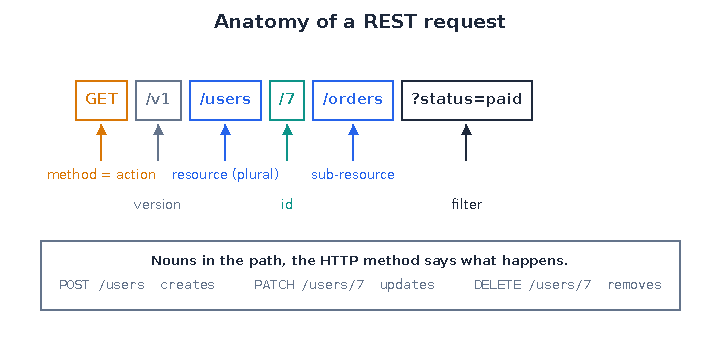
| Avoid | Prefer |
|---|---|
POST /createUser | POST /users |
GET /getUser?id=7 | GET /users/7 |
POST /deleteUser/7 | DELETE /users/7 |
GET /user/7/getOrders | GET /users/7/orders |
Keep paths lowercase, use hyphens for multi-word names (/order-items), and don't nest deeper than one or two levels.
2. Use HTTP methods for what they mean#
| Method | Use for | Safe to retry? |
|---|---|---|
GET | Read | Yes |
POST | Create, or run an action | No (use a key) |
PUT | Replace a whole resource | Yes |
PATCH | Update some fields | Usually |
DELETE | Remove | Yes |
"Safe to retry" means idempotent: sending the same request twice has the same effect as sending it once. GET must never change data.
3. Return the right status codes#
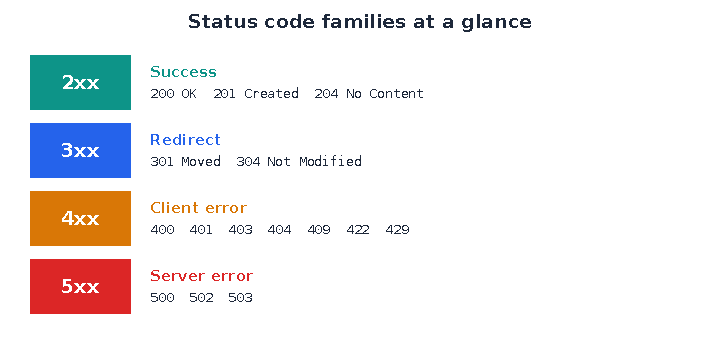
| Code | When |
|---|---|
200 OK | Successful read or update |
201 Created | New resource created (add a Location header) |
204 No Content | Success with no body, e.g. delete |
400 Bad Request | Malformed request |
401 Unauthorized | Not logged in or bad token |
403 Forbidden | Logged in, but not allowed |
404 Not Found | Resource doesn't exist |
409 Conflict | Duplicate or version conflict |
422 Unprocessable | Valid JSON, failed validation |
429 Too Many Requests | Rate limit hit |
500 | A bug on the server |
Never return 200 OK with {"success": false} in the body. Clients, proxies and monitoring tools all rely on the status code to know something failed.
4. One consistent error format#
Every error should look the same, so clients can handle them in one place. A good choice is the Problem Details standard (RFC 9457):
{
  "type": "https://api.example.com/errors/validation",
  "title": "Validation failed",
  "status": 422,
  "detail": "Some fields are invalid.",
  "errors": [
    { "field": "email", "message": "Must be a valid email" }
  ]
}
Write messages a developer can act on. "Invalid input" is useless; "email must be a valid email address" saves a support ticket.
5. Paginate every list#
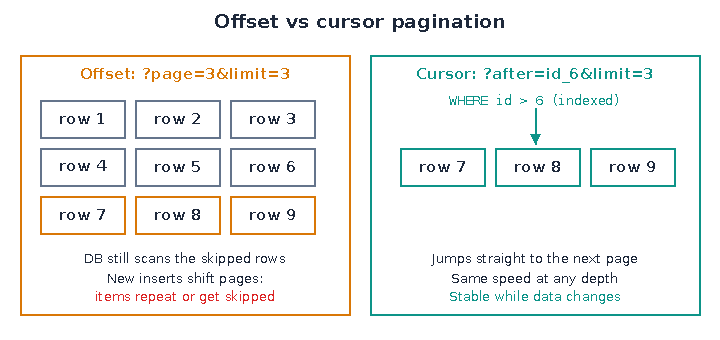
A list endpoint that returns everything works until the table has a million rows. Always paginate, with a sensible default and a maximum page size.
- Offset pagination (
?page=3&limit=20): simple and lets users jump to a page, but slows down on deep pages and can skip or repeat items when data changes. - Cursor pagination (
?limit=20&cursor=abc): stable and fast at any depth. Best for feeds and large tables.
{
  "data": [ { "id": 101 }, { "id": 102 } ],
  "nextCursor": "eyJpZCI6MTAyfQ",
  "hasMore": true
}
6. Filtering, sorting and field selection#
GET /orders?status=shipped&sort=-createdAt&limit=20
GET /users/7?fields=id,name,email
Pick one convention and use it everywhere: for example a minus sign for descending sort. Validate every query parameter, and only allow sorting and filtering on indexed fields.
7. Make POST safe to retry#
Networks fail. If a payment request times out, the client doesn't know whether it went through. An idempotency key solves this: the client sends a unique ID, and the server returns the saved result if it sees the same key again instead of charging twice.
POST /payments
Idempotency-Key: 5f2c9a1e-7b3d-4c8e-9f10-2a6b8c4d1e3f
8. Version from day one#
You will need to make breaking changes eventually. Put a version in the URL (/v1/users) or a header, and never break an existing version. Adding fields is fine; removing or renaming fields needs a new version.
A small Express example#
app.post("/v1/users", async (req, res) => {
  const { email, name } = req.body ?? {};
  if (!email || !email.includes("@")) {
    return res.status(422).json({
      title: "Validation failed",
      status: 422,
      errors: [{ field: "email", message: "Must be a valid email" }],
    });
  }
  const user = await db.users.create({ email, name });
  res.status(201).location(`/v1/users/${user.id}`).json(user);
});
Key takeaways#
- Plural nouns in URLs; HTTP methods describe the action.
- Return accurate status codes and one consistent error format.
- Paginate every list; prefer cursors for large or changing data.
- Use idempotency keys for retries and version your API from the start.