Caching With Redis in Node.js: Patterns, TTLs and Invalidation
Speed up your Node.js API with Redis: the cache-aside pattern, choosing TTLs, invalidating stale data, avoiding cache stampedes and what not to cache, with working code.

Your product page runs five database queries and takes 300 ms. Thousands of users load the same page, and the data changes a few times a day. Computing the same answer again and again is wasted work. A cache stores the answer once and serves it in a millisecond or two. Redis, an in-memory key-value store, is the most common tool for the job.

Why Redis#
- Fast: data lives in memory, so reads typically take well under a millisecond on the server.
- Shared: every instance of your app sees the same cache, unlike an in-process
Map. - Built-in expiry: any key can have a time-to-live (TTL) and disappears automatically.
- Useful data types: strings, hashes, lists, sets and sorted sets, plus counters for rate limiting.
The cache-aside pattern#
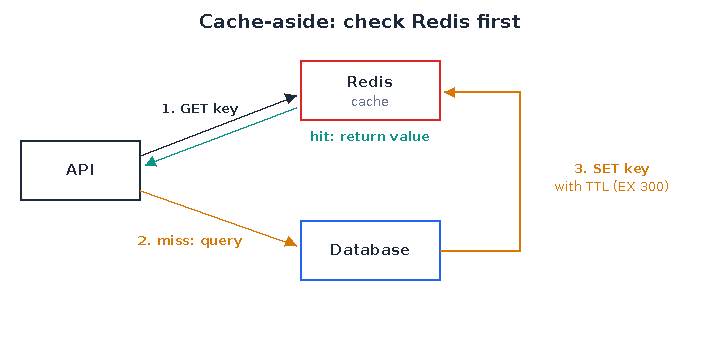
This is the pattern you will use 90% of the time:
- Look for the value in Redis.
- Hit: return it.
- Miss: load it from the database, store it in Redis with a TTL, then return it.
import { createClient } from "redis";

const redis = createClient({ url: process.env.REDIS_URL });
await redis.connect();

async function getProduct(id) {
  const key = `product:${id}`;

  const cached = await redis.get(key);
  if (cached) return JSON.parse(cached);   // hit

  const product = await db.products.findById(id); // miss
  if (product) {
    await redis.set(key, JSON.stringify(product), { EX: 300 });
  }
  return product;
}
EX: 300 sets a 5-minute TTL. After that, the next request misses and loads fresh data.
Choosing a TTL#
| Data | Typical TTL |
|---|---|
| Site settings, categories | Hours |
| Product details, profiles | 5–30 minutes |
| Search results, feeds | 30 seconds – 5 minutes |
| Stock levels, prices at checkout | Don't cache, or seconds |
Ask: "how stale can this be before a user notices or it costs money?" That is your TTL. Always set one, so a bug in invalidation can't serve wrong data forever.
Keeping data fresh: invalidation#
TTLs alone mean users may see old data until the key expires. When you know the data changed, delete the key right after the database write:
async function updateProduct(id, changes) {
  const product = await db.products.update(id, changes);
  await redis.del(`product:${id}`); // next read reloads it
  return product;
}
Deleting is safer than writing the new value into the cache: two updates arriving close together can otherwise leave the older value in Redis.
Use a clear key naming scheme such as entity:id or entity:id:variant (product:42:en). It makes keys easy to find, debug and delete.
The cache stampede problem#
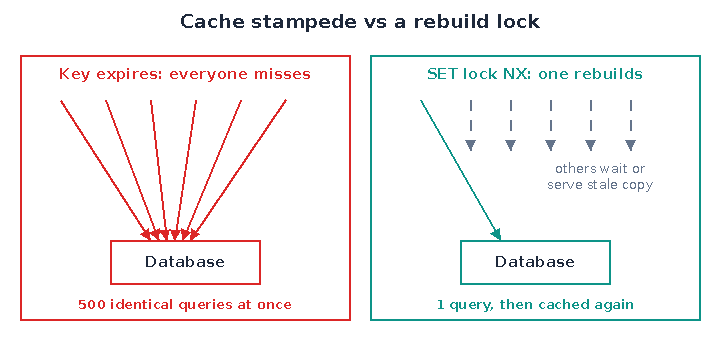
A popular key expires. In the same second, 500 requests miss and all hit the database at once. This is a stampede, and it can take a database down. Common defences:
- Add jitter to TTLs so keys don't all expire together:
EX: 300 + Math.floor(Math.random() * 60). - Lock on miss: only one request rebuilds the value while others wait briefly or serve slightly stale data.
- Refresh ahead: rebuild hot keys in the background before they expire.
// Simple lock: only the first request rebuilds
const gotLock = await redis.set(`lock:${key}`, "1", { NX: true, EX: 10 });
if (gotLock) {
  const fresh = await loadFromDb();
  await redis.set(key, JSON.stringify(fresh), { EX: 300 });
  await redis.del(`lock:${key}`);
}
Other handy Redis uses#
- Rate limiting:
INCRa counter per user per minute and set an expiry. - Sessions: fast, shared session storage across servers.
- Leaderboards: sorted sets keep scores ordered automatically.
- Pub/Sub: broadcast messages between app servers.
What not to cache#
- Data that must be exact right now, like account balances during a payment.
- Responses that differ per user unless the key includes the user ID; otherwise one user can see another's data.
- Huge values. Very large keys slow Redis down for everyone; cache smaller pieces instead.
Your app must work when Redis is down. Wrap cache calls so a Redis error falls back to the database instead of failing the request.
Key takeaways#
- Cache-aside: check Redis, on a miss load from the database and store with a TTL.
- Always set a TTL, sized to how stale the data can be.
- Delete keys after writes to keep data fresh.
- Prevent stampedes with TTL jitter or a rebuild lock, and fall back to the database if Redis fails.