Rate Limiting Explained: Algorithms, Real-World Use Cases and Production Problems (with Node.js and Redis)
A complete guide to rate limiting: what it is, the five main algorithms, real-world use cases like login protection and API plans, production problems, and working Node.js and Redis code.

Rate limiting controls how many requests a client can make in a period of time, for example "100 requests per minute per user". When a client goes over the limit, the server rejects the extra requests (usually with 429 Too Many Requests) instead of letting them overload the system. It is one of the most important protections in any public API, and a favourite system design interview topic.
Why rate limiting matters#
- Security: stops brute-force password guessing, credential stuffing and OTP abuse.
- Stability: one buggy client stuck in a retry loop should not take down the service for everyone.
- Fairness: prevents a "noisy neighbour" from using all the capacity on a shared platform.
- Cost control: every request costs CPU, database queries, SMS fees or paid AI API tokens. Limits keep the bill predictable.
- Business plans: free tier gets 1,000 calls a day, pro tier gets 100,000. Rate limits enforce the pricing.
Key terms#
| Term | Meaning |
|---|---|
| Limit | Maximum requests allowed, e.g. 100 |
| Window | The time period the limit applies to, e.g. 60 seconds |
| Key / identifier | Who is being limited: user ID, API key, IP address, or a combination with the endpoint |
| Burst | A short spike of requests above the average rate |
| Throttling | Slowing requests down (queueing or delaying) instead of rejecting them |
| 429 | HTTP status for "Too Many Requests", usually sent with a Retry-After header |
The five main algorithms#
1. Fixed window counter#
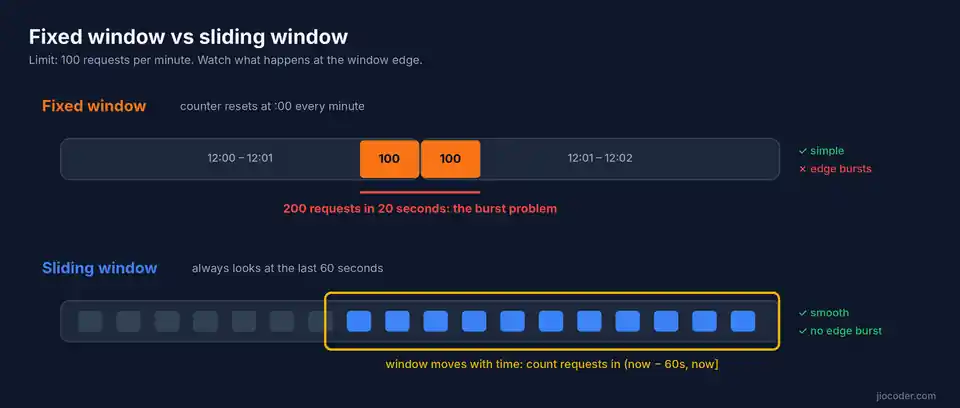
Keep a counter per key per window (e.g. per minute). Increment on each request; reject when it passes the limit. The counter resets at the start of every window.
Pros: very simple, tiny memory. Cons: the boundary burst problem. A client can send 100 requests at 12:00:59 and another 100 at 12:01:00, so 200 requests in about one second, double the intended rate.
2. Sliding window log#
Store the timestamp of every request (for example in a Redis sorted set). On each new request, delete timestamps older than 60 seconds and count what's left. Perfectly accurate, but memory grows with traffic because you store one entry per request.
3. Sliding window counter#
A smart approximation: keep counters for the current and previous fixed windows and weight the previous one by how much of it still overlaps the sliding window.
// 40% into the current minute:
// estimated = current + previous * (1 - 0.40)
const estimated = currentCount + previousCount * (1 - elapsedFraction);
if (estimated >= limit) reject();
Almost as accurate as the log, with the memory of the fixed window. This is what many large platforms use.
4. Token bucket#
Each key has a bucket that holds up to capacity tokens. Tokens refill at a steady rate. Every request takes one token; if the bucket is empty, the request is rejected.
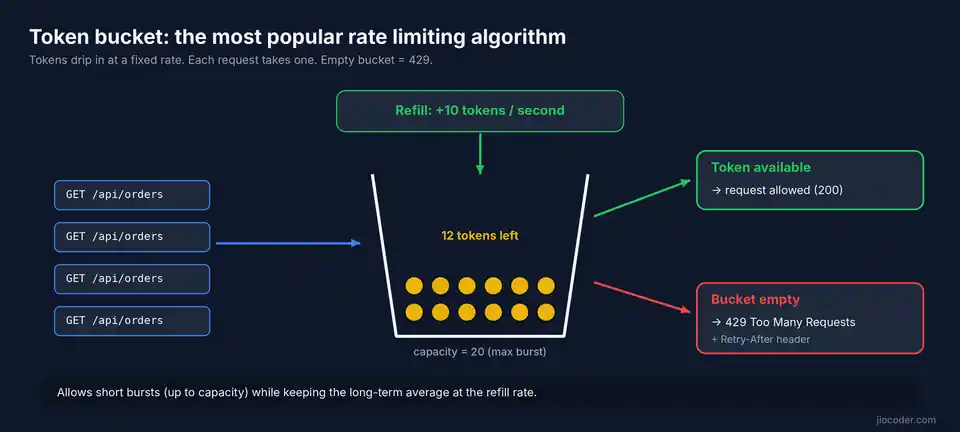
The big advantage: it allows short bursts (up to the capacity) while keeping the long-term average at the refill rate. Real users behave in bursts (a page load fires 10 API calls at once), so this feels natural. Cloud providers such as AWS API Gateway describe their throttling as a token bucket with a "rate" and a "burst".
5. Leaky bucket#
Requests enter a queue and "leak out" to be processed at a constant rate. If the queue is full, new requests are dropped. It smooths traffic into a perfectly steady stream, which is ideal when the thing behind it (a legacy system, a payment provider) can only handle a fixed rate. Nginx's limit_req works like this.
Which one should you use?#
| Algorithm | Bursts | Accuracy | Memory | Good for |
|---|---|---|---|---|
| Fixed window | 2x at edges | Low | Tiny | Simple internal limits, daily quotas |
| Sliding log | None | Exact | High | Low-volume, high-value actions (logins, payments) |
| Sliding counter | Small | High | Tiny | General API limits at scale |
| Token bucket | Allowed, controlled | High | Tiny | Public APIs, user-facing traffic |
| Leaky bucket | Smoothed out | High | Queue size | Protecting fixed-capacity downstream systems |
Real-world use cases#
| Scenario | Typical limit | Key |
|---|---|---|
| Login endpoint | 5 attempts / 15 min, then lockout or CAPTCHA | IP + username |
| Send OTP / SMS | 3 per phone number per hour | Phone number + IP |
| Public REST API | Per plan: 60/min free, 1,000/min paid | API key |
| Search / autocomplete | 10 req/sec with burst 20 | User ID |
| File upload / export | 5 per hour (expensive jobs) | User ID |
| AI / LLM features | Requests and tokens per minute | User or organisation |
| Webhooks you send | Max N per second to each customer's server | Destination |
| Calling a third-party API | Stay under their limit (client-side limiting) | Your API key |
Where to put the rate limiter#
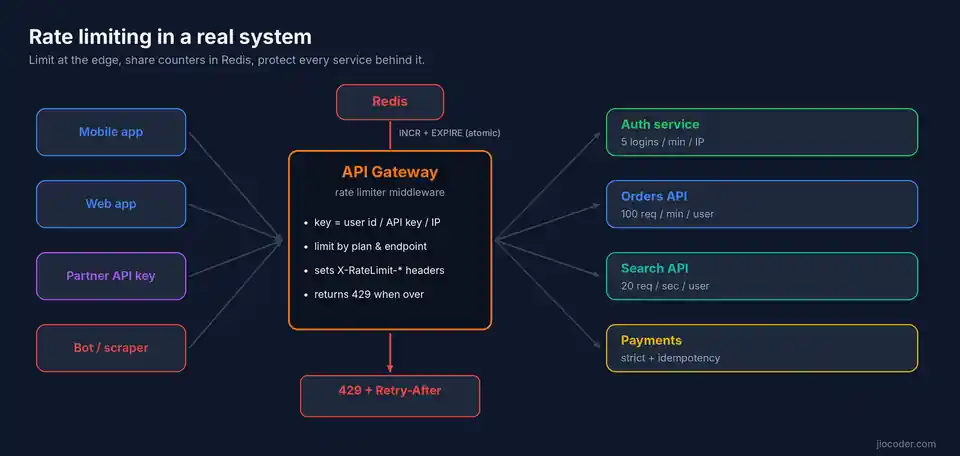
- Edge / CDN / WAF (Cloudflare, AWS WAF): blocks floods by IP before they reach you. Coarse but cheap.
- API gateway / reverse proxy (Nginx, Kong, AWS API Gateway): per-route and per-key limits in one place.
- Application middleware: has full context (user ID, plan, endpoint cost), so it can apply business rules.
- Use layers: a generous IP limit at the edge plus precise per-user limits in the app.
Implementation in Node.js#
Quick start with express-rate-limit#
import express from "express";
import { rateLimit } from "express-rate-limit";

const app = express();
app.set("trust proxy", 1); // behind a load balancer: use the real client IP

const apiLimiter = rateLimit({
  windowMs: 60 * 1000,      // 1 minute
  limit: 100,               // 100 requests per window per key
  standardHeaders: "draft-7", // send RateLimit headers
  legacyHeaders: false,
});

const loginLimiter = rateLimit({
  windowMs: 15 * 60 * 1000,
  limit: 5,
  keyGenerator: (req) => `${req.ip}:${req.body?.email ?? ""}`,
  message: { error: "Too many login attempts. Try again in 15 minutes." },
});

app.use("/api", apiLimiter);
app.post("/auth/login", express.json(), loginLimiter, loginHandler);The default store keeps counters in memory. With 3 server instances, each one counts separately, so a user effectively gets 3x the limit, and counters vanish on restart. In production use a shared store such as Redis.
Fixed window with Redis#
import Redis from "ioredis";
const redis = new Redis(process.env.REDIS_URL);

export function fixedWindow({ limit, windowSec }) {
  return async (req, res, next) => {
    const id = req.user?.id ?? req.ip;
    const window = Math.floor(Date.now() / 1000 / windowSec);
    const key = `rl:${id}:${window}`;

    // INCR and EXPIRE in one round trip
    const [[, count]] = await redis.multi().incr(key).expire(key, windowSec).exec();

    res.set("RateLimit-Limit", String(limit));
    res.set("RateLimit-Remaining", String(Math.max(0, limit - count)));
    if (count > limit) {
      res.set("Retry-After", String(windowSec - (Math.floor(Date.now() / 1000) % windowSec)));
      return res.status(429).json({ error: "Too many requests" });
    }
    next();
  };
}
Token bucket with Redis and Lua (atomic)#
Read-then-write from Node has a race condition: two servers can read "1 token left" at the same moment and both allow the request. A Lua script runs atomically inside Redis, so this cannot happen. Using Redis's own clock also avoids clock differences between app servers.
const TOKEN_BUCKET = `
local capacity = tonumber(ARGV[1])
local rate     = tonumber(ARGV[2])          -- tokens per second
local t        = redis.call("TIME")
local now      = t[1] * 1000 + math.floor(t[2] / 1000)

local data   = redis.call("HMGET", KEYS[1], "tokens", "ts")
local tokens = tonumber(data[1]) or capacity
local ts     = tonumber(data[2]) or now

tokens = math.min(capacity, tokens + (now - ts) / 1000 * rate)
local allowed = 0
if tokens >= 1 then
  tokens = tokens - 1
  allowed = 1
end

redis.call("HSET", KEYS[1], "tokens", tokens, "ts", now)
redis.call("PEXPIRE", KEYS[1], math.ceil(capacity / rate * 1000))
return { allowed, math.floor(tokens) }
`;

redis.defineCommand("tokenBucket", { numberOfKeys: 1, lua: TOKEN_BUCKET });

export function tokenBucket({ capacity, ratePerSec }) {
  return async (req, res, next) => {
    const key = `tb:${req.user?.id ?? req.ip}`;
    const [allowed, remaining] = await redis.tokenBucket(key, capacity, ratePerSec);
    res.set("RateLimit-Remaining", String(remaining));
    if (!allowed) {
      res.set("Retry-After", String(Math.ceil(1 / ratePerSec)));
      return res.status(429).json({ error: "Slow down" });
    }
    next();
  };
}

// 20-request burst, 10 requests/second sustained
app.use("/api/search", tokenBucket({ capacity: 20, ratePerSec: 10 }));
Nginx in front of everything#
# nginx.conf: 10 req/s per IP, allow bursts of 20 without delay
limit_req_zone $binary_remote_addr zone=api:10m rate=10r/s;

server {
  location /api/ {
    limit_req zone=api burst=20 nodelay;
    limit_req_status 429;
    proxy_pass http://app;
  }
}
Real-world problems (and how to solve them)#
Problem 1: Many users behind one IP#
Offices, universities and mobile carriers put thousands of people behind one public IP (NAT / CGNAT). An IP limit punishes all of them for one heavy user. Fix: limit by user ID or API key once authenticated, and keep IP limits generous and only for anonymous traffic.
Problem 2: Getting the wrong IP behind a proxy#
Behind a load balancer, req.ip may be the load balancer's IP, so everyone shares one bucket. If you blindly trust X-Forwarded-For, attackers can fake it and get a fresh limit per request. Fix: configure trust proxy to exactly the number of proxies you run.
Problem 3: Distributed counters and race conditions#
In-memory counters break with multiple instances, and non-atomic read-modify-write lets requests slip through under concurrency. Fix: a central Redis with atomic operations (INCR, MULTI or Lua). For global, multi-region systems, accept small inaccuracy and sync counters asynchronously.
Problem 4: Retry storms and the thundering herd#
Clients that get a 429 and retry immediately create even more load, which causes more 429s. When the window resets, every client retries at the same second. Fix: send Retry-After, and make clients use exponential backoff with jitter:
async function fetchWithRetry(url, options = {}, maxRetries = 5) {
  for (let attempt = 0; ; attempt++) {
    const res = await fetch(url, options);
    if (res.status !== 429 || attempt === maxRetries) return res;

    const retryAfter = Number(res.headers.get("Retry-After"));
    const backoff = Math.min(30_000, 2 ** attempt * 500);       // 0.5s, 1s, 2s, 4s...
    const wait = retryAfter ? retryAfter * 1000 : Math.random() * backoff; // full jitter
    await new Promise((r) => setTimeout(r, wait));
  }
}
Problem 5: SMS pumping and OTP abuse#
Attackers trigger thousands of "send OTP" requests to premium-rate numbers they control and earn money from your SMS bill. Fix: strict per-phone and per-IP limits, a global daily SMS budget with alerts, CAPTCHA after the first attempt, and blocking unexpected country codes.
Problem 6: Credential stuffing spread across many IPs#
Botnets try leaked passwords from thousands of IPs, one or two attempts each, so per-IP limits never trigger. Fix: also limit per account (failed logins for this username), add progressive delays, and use bot detection and breached-password checks.
Problem 7: Not all requests cost the same#
A simple GET /profile and a POST /reports/export that runs for 30 seconds should not count the same. Fix: cost-based limiting: give each endpoint a weight and subtract that many tokens. GraphQL APIs often limit by calculated query complexity instead of request count.
Problem 8: What happens when Redis is down?#
If the limiter can't reach Redis, you must choose: fail open (allow all requests, keep the site up) or fail closed (reject requests, stay safe). Most APIs fail open for general traffic but fail closed for sensitive endpoints like login and payments. Add a short timeout so a slow Redis doesn't slow every request.
Problem 9: You are the one being rate limited#
When calling GitHub, Stripe, OpenAI or any third-party API, you have to respect their limits. Fix: read their rate limit headers, queue outgoing calls through a client-side limiter (e.g. the bottleneck package), cache responses, and use batch endpoints where available.
Communicate limits clearly#
HTTP/1.1 429 Too Many Requests
Content-Type: application/json
Retry-After: 30
RateLimit-Limit: 100
RateLimit-Remaining: 0
RateLimit-Reset: 30

{ "error": "rate_limited", "message": "Limit of 100 requests per minute exceeded. Retry in 30 seconds." }- Use 429, not 500 or 403, so clients know to back off.
- Always include
Retry-After. - Document your limits per endpoint and plan.
- Log and monitor 429s: a sudden spike means either an attack or a limit that is too strict for real users.
Before enforcing a new limit, run it in shadow mode: log who would have been blocked for a week. You'll catch legitimate heavy users (a partner's batch job, your own mobile app's sync) before you break them.
Key takeaways#
- Rate limiting caps requests per client per time window to protect security, stability, fairness and cost.
- Token bucket allows controlled bursts and is the best default; sliding window counter is accurate and cheap; fixed window has a 2x burst problem at window edges.
- Limit by user or API key when possible; IP limits hurt users behind shared IPs and break behind misconfigured proxies.
- Use a shared store like Redis with atomic operations (Lua) when you run more than one server.
- Return 429 with
Retry-After, and make clients retry with exponential backoff and jitter. - Plan for real attacks (credential stuffing, SMS pumping), cost-based limits and Redis outages (fail open vs fail closed).