PostgreSQL Indexes Explained: Make Slow Queries Fast
How PostgreSQL indexes work, how to read EXPLAIN ANALYZE, when to use B-tree, composite, partial and GIN indexes, and the mistakes that make indexes useless.
Your app is fast with 1,000 rows and painfully slow with 1,000,000. The most common reason is a missing index. An index is like the index at the back of a book: instead of reading every page to find "closures", you jump straight to the right page.
What happens without an index#
Take a table of orders and a common query:
SELECT * FROM orders
WHERE customer_id = 4821;
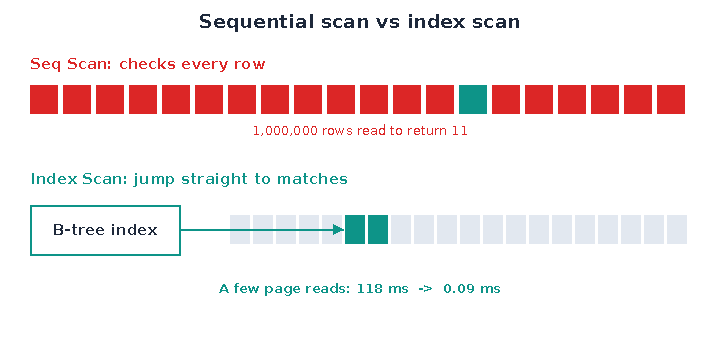
Without an index on customer_id, PostgreSQL must read every row and check it. This is a sequential scan. Its cost grows with the table, so the query gets slower every day your app grows.
Reading the query plan#
Put EXPLAIN ANALYZE in front of a query to see what PostgreSQL actually did and how long it took:
EXPLAIN ANALYZE
SELECT * FROM orders WHERE customer_id = 4821;Seq Scan on orders
(cost=0.00..20834.00 rows=12 width=64)
(actual time=0.41..118.30 rows=11 loops=1)
Filter: (customer_id = 4821)
Rows Removed by Filter: 999989
Execution Time: 118.35 msThe warning signs: Seq Scan on a big table, and Rows Removed by Filter close to the table size. It read a million rows to return 11.
Adding an index#
CREATE INDEX idx_orders_customer
ON orders (customer_id);Index Scan using idx_orders_customer on orders
(actual time=0.03..0.06 rows=11 loops=1)
Index Cond: (customer_id = 4821)
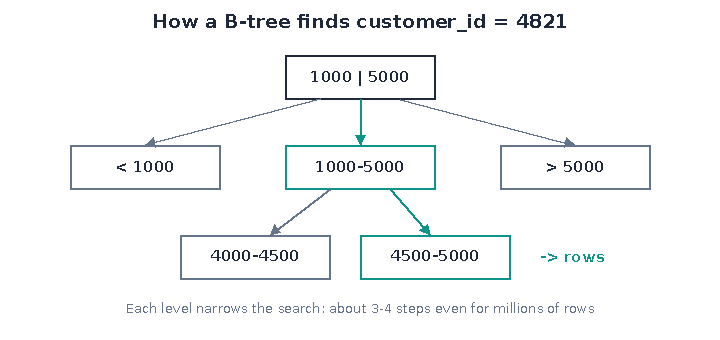
Execution Time: 0.09 msSame result, about a thousand times faster. The default index type is a B-tree: a sorted, balanced tree that finds a value in a few steps, even among millions of rows.
On a busy production table, a plain CREATE INDEX blocks writes until it finishes. Use CREATE INDEX CONCURRENTLY instead. It takes longer but lets inserts and updates continue.
Composite indexes and column order#
For queries that filter on several columns, one index can cover them all:
CREATE INDEX idx_orders_customer_date
  ON orders (customer_id, created_at);
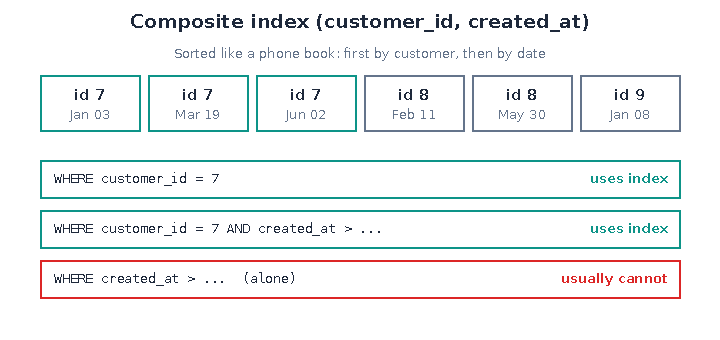
Column order matters. This index works like a phone book sorted by last name, then first name. It helps:
WHERE customer_id = 7WHERE customer_id = 7 AND created_at > '2026-01-01'WHERE customer_id = 7 ORDER BY created_at DESC
But it usually doesn't help WHERE created_at > '2026-01-01' on its own, because the first column isn't used. A good rule: put columns used with = first, and range or sort columns after.
Other index types worth knowing#
| Index | Good for |
|---|---|
| B-tree (default) | =, <, >, BETWEEN, ORDER BY |
| Partial | Only some rows, e.g. active orders |
| Expression | Searching on a computed value |
| GIN | JSONB, arrays, full-text search |
| BRIN | Huge tables naturally ordered by time |
-- Partial: only index rows you query often
CREATE INDEX idx_orders_pending
  ON orders (created_at)
  WHERE status = 'pending';

-- Expression: case-insensitive email lookup
CREATE INDEX idx_users_email_lower
  ON users (lower(email));
-- used by: WHERE lower(email) = 'a@b.com'

-- GIN: search inside JSONB
CREATE INDEX idx_products_attrs
  ON products USING gin (attributes);
-- used by: WHERE attributes @> '{"color": "red"}'
When an index won't be used#
- A function on the column:
WHERE lower(email) = ...can't use a plain index onemail. Create an expression index. - Leading wildcard:
LIKE '%son'can't use a B-tree. (LIKE 'son%'can, with the right operator class.) - Type mismatch: comparing a text column to a number forces a conversion.
- Low selectivity: if a query returns a large share of the table, a sequential scan really is faster, and the planner picks it on purpose.
- Stale statistics: after big data changes, run
ANALYZE orders;so the planner has accurate numbers.
Indexes are not free#
Every index takes disk space and must be updated on every INSERT, UPDATE and DELETE. Ten indexes on a write-heavy table can slow writes noticeably. Index for the queries you actually run, and remove indexes that are never used. You can find them with:
SELECT relname, indexrelname, idx_scan
FROM pg_stat_user_indexes
WHERE idx_scan = 0
ORDER BY relname;Foreign key columns are not indexed automatically in PostgreSQL. If you join or delete on orders.customer_id, add the index yourself.
Key takeaways#
- Use
EXPLAIN ANALYZEto find sequential scans on large tables. - B-tree is the default and handles equality, ranges and sorting.
- In composite indexes, put equality columns first, then range or sort columns.
- Use partial, expression and GIN indexes for special cases, and drop unused indexes.