JWT Authentication Done Right: Access Tokens, Refresh Tokens and Cookies
How JWT authentication really works: token structure, signing, short-lived access tokens, refresh token rotation, httpOnly cookies and the security mistakes to avoid, with Express code.
Almost every modern API uses JSON Web Tokens (JWT) for login. They are simple to start with and easy to get wrong. This guide explains what a JWT is, how the server trusts it, and the access-plus-refresh-token pattern that most production apps use.
What a JWT looks like#
A JWT is three Base64URL-encoded parts joined by dots: header.payload.signature.

eyJhbGciOiJIUzI1NiJ9      ← header
.eyJzdWIiOiI0MiIsInJvbGUi
OiJ1c2VyIiwiZXhwIjoxNzk5
OTk5OTk5fQ                ← payload
.Xy3k...signature         ← signature
Decoded, the first two parts are plain JSON:
// header
{ "alg": "HS256", "typ": "JWT" }

// payload ("claims")
{ "sub": "42", "role": "user", "exp": 1799999999 }The payload is encoded, not encrypted. Anyone holding the token can read it. Never put passwords, card numbers or other secrets in a JWT.
How the server trusts it#
The signature is made from the header, the payload and a secret key that only the server knows. When a token comes back, the server recomputes the signature. If anyone changed even one character of the payload, the signatures no longer match and the token is rejected.
That gives JWTs their main advantage: the server can verify a request without a database lookup. The token itself says who the user is and when it expires.
Why one token is not enough#
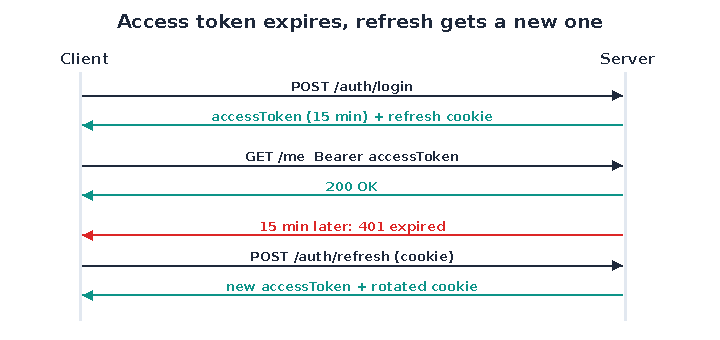
A JWT can't be "logged out" easily: it stays valid until it expires. So you face a trade-off. A long expiry is convenient but dangerous if the token is stolen. A short expiry is safer but forces users to log in constantly. The standard answer is two tokens:
| Access token | Refresh token | |
|---|---|---|
| Lifetime | Short, e.g. 15 minutes | Long, e.g. 7–30 days |
| Sent with | Every API request | Only to /auth/refresh |
| Stored on server? | No | Yes, so it can be revoked |
When the access token expires, the client quietly calls the refresh endpoint to get a new one. Logging out deletes the refresh token on the server, so no new access tokens can be issued.
Implementation with Express#
Using the jsonwebtoken and cookie-parser packages:
import express from "express";
import jwt from "jsonwebtoken";
import cookieParser from "cookie-parser";
import crypto from "node:crypto";

const app = express();
app.use(express.json());
app.use(cookieParser());

const ACCESS_SECRET = process.env.ACCESS_SECRET;
const refreshStore = new Map(); // use a DB table in production

function issueTokens(res, userId) {
  const access = jwt.sign({ sub: userId }, ACCESS_SECRET, {
    expiresIn: "15m",
  });
  const refresh = crypto.randomBytes(32).toString("hex");
  refreshStore.set(refresh, {
    userId,
    expires: Date.now() + 7 * 24 * 3600 * 1000,
  });
  res.cookie("refresh", refresh, {
    httpOnly: true,     // JavaScript can't read it
    secure: true,       // HTTPS only
    sameSite: "strict", // not sent cross-site
    path: "/auth",      // only sent to auth routes
    maxAge: 7 * 24 * 3600 * 1000,
  });
  return access;
}
The refresh token here is a random string stored on the server, which makes it easy to revoke. Some systems use a signed JWT for it instead; either works as long as the server can invalidate it.
Login, refresh and logout#
app.post("/auth/login", async (req, res) => {
  const user = await checkPassword(req.body); // your logic
  if (!user) return res.status(401).json({ error: "Invalid login" });
  res.json({ accessToken: issueTokens(res, user.id) });
});

app.post("/auth/refresh", (req, res) => {
  const old = req.cookies.refresh;
  const record = old && refreshStore.get(old);
  if (!record || record.expires < Date.now()) {
    return res.status(401).json({ error: "Please log in again" });
  }
  refreshStore.delete(old); // rotation: each token works once
  res.json({ accessToken: issueTokens(res, record.userId) });
});

app.post("/auth/logout", (req, res) => {
  refreshStore.delete(req.cookies.refresh);
  res.clearCookie("refresh", { path: "/auth" });
  res.sendStatus(204);
});
Protecting routes#
function requireAuth(req, res, next) {
  const header = req.headers.authorization || "";
  const token = header.startsWith("Bearer ")
    ? header.slice(7)
    : null;
  if (!token) return res.sendStatus(401);
  try {
    const payload = jwt.verify(token, ACCESS_SECRET, {
      algorithms: ["HS256"],
    });
    req.userId = payload.sub;
    next();
  } catch {
    res.sendStatus(401); // expired or tampered
  }
}

app.get("/me", requireAuth, (req, res) => {
  res.json({ id: req.userId });
});
Where should the browser store tokens?#
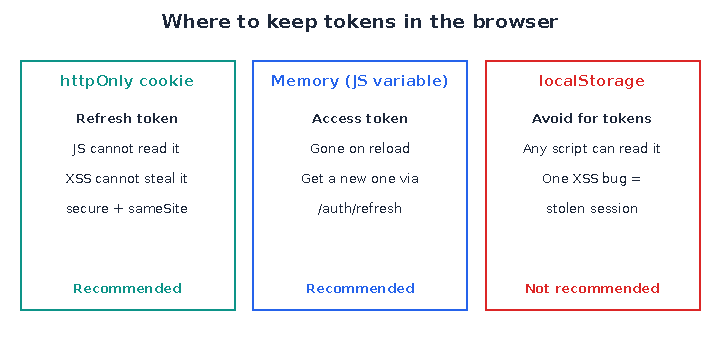
- Refresh token: an
httpOnly,secure,sameSitecookie, as above. Scripts can't read it, so an XSS bug can't steal it. - Access token: keep it in memory (a JavaScript variable or app state) and send it in the
Authorizationheader. On page reload, call/auth/refreshto get a fresh one. - Avoid
localStoragefor long-lived tokens: any injected script on your page can read it.
Security checklist#
- Use a long, random secret (32+ bytes) from an environment variable, never from source code.
- Pin the algorithm when verifying (
algorithms: ["HS256"]) so attackers can't switch it. - Keep access tokens short-lived; always set
exp. - Rotate refresh tokens on every use, and if an already-used one appears again, revoke all of that user's sessions: it was probably stolen.
- Serve everything over HTTPS.
- Put only what you need in the payload: a user ID and maybe a role.
JWTs are not always the right tool. For a single server-rendered website, classic server sessions with a session cookie are simpler and just as secure. JWTs shine when several services or mobile apps need to verify the same user.
Key takeaways#
- A JWT is header.payload.signature; the payload is readable, the signature proves it wasn't changed.
- Use a short-lived access token plus a revocable, rotating refresh token.
- Store the refresh token in an
httpOnlysecure cookie and the access token in memory. - Pin the algorithm, use a strong secret and never put secrets in the payload.