How DNS Works: From Domain Name to IP Address
Understand how DNS resolves domain names: resolvers, root, TLD and authoritative servers, caching and TTL, record types and debugging with dig.

DNS (Domain Name System) translates human-friendly names like jiocoder.com into IP addresses that computers use. Almost every network request you make starts with a DNS lookup.
The players in a DNS lookup#
- Stub resolver – the small DNS client in your OS or browser.
- Recursive resolver – usually run by your ISP or a public provider (like 1.1.1.1 or 8.8.8.8). It does the hard work of finding the answer.
- Root name servers – the top of the hierarchy. They know where each top-level domain lives.
- TLD name servers – responsible for
.com,.in,.organd so on. - Authoritative name servers – hold the actual records for a domain.
A lookup, step by step#
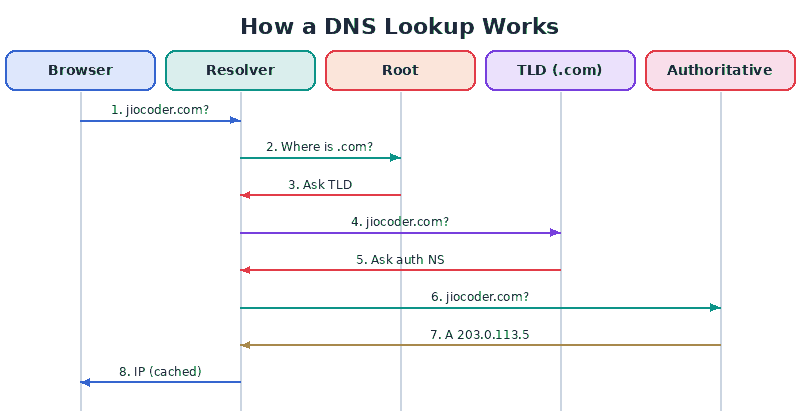
- Your browser asks the recursive resolver: "What's the IP of
jiocoder.com?" - If not cached, the resolver asks a root server, which replies with the addresses of the
.comTLD servers. - The resolver asks a .com TLD server, which replies with the domain's authoritative name servers.
- The resolver asks the authoritative server, which returns the A (or AAAA) record.
- The resolver caches the answer and returns it to your browser, which then opens a connection to that IP.
The resolver's queries are iterative (each server points to the next), while your browser's query to the resolver is recursive (it expects a final answer).
Caching and TTL#
Every DNS record has a TTL (time to live) in seconds. Browsers, operating systems and resolvers cache answers until the TTL expires. That's why most lookups are answered in milliseconds – and why DNS changes can take time to "propagate".
Planning a server migration? Lower the TTL (e.g. to 300 seconds) a day before the change, then raise it again once everything is stable.
Common DNS record types#
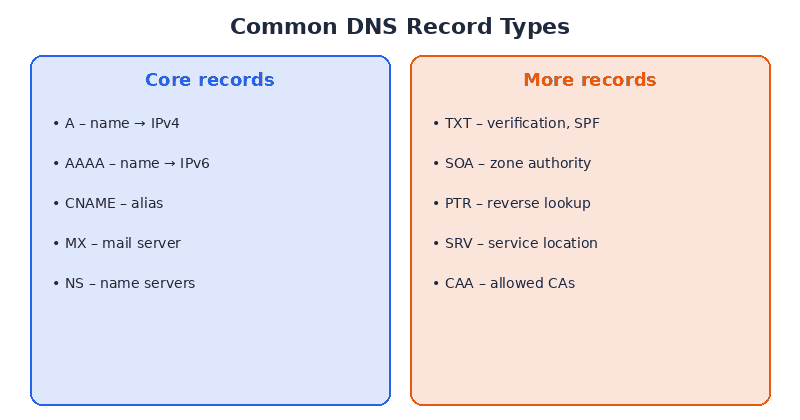
| Record | Purpose | Example |
|---|---|---|
| A | Name → IPv4 | jiocoder.com → 203.0.113.5 |
| AAAA | Name → IPv6 | jiocoder.com → 2001:db8::5 |
| CNAME | Alias to another name | www → jiocoder.com |
| MX | Mail server for the domain | 10 mail.jiocoder.com |
| TXT | Free text: SPF, DKIM, domain verification | v=spf1 include:... ~all |
| NS | Authoritative name servers | ns1.provider.net |
Debugging DNS from the terminal#
# Basic lookup
dig jiocoder.com

# Only the answer
dig +short jiocoder.com

# Specific record type
dig MX gmail.com
dig AAAA google.com

# Follow the full chain from the root
dig +trace jiocoder.com

# Ask a specific resolver
dig @1.1.1.1 jiocoder.com
DNS security in brief#
- DNS spoofing / cache poisoning – an attacker injects fake answers into a resolver's cache.
- DNSSEC – signs records so resolvers can verify they're authentic.
- DoH / DoT – DNS over HTTPS or TLS encrypts queries so others on the network can't read or tamper with them.
Key takeaways#
- DNS maps names to IP addresses through a hierarchy: root → TLD → authoritative.
- Recursive resolvers do the lookup work and cache results.
- TTL controls how long answers are cached.
- A, AAAA, CNAME, MX and TXT are the records you'll use most.
digis your best friend for DNS debugging.