GitHub Actions CI/CD for Node.js: Test, Build and Deploy on Every Push
Set up a GitHub Actions pipeline for a Node.js app: workflows, jobs and steps, dependency caching, a Node version matrix, secrets, deploy only from main, and tips to keep pipelines fast and safe.
Continuous Integration (CI) means every push is automatically built and tested. Continuous Deployment (CD) means code that passes is automatically shipped. Together they catch bugs before users do and remove the "it worked on my machine" deploy. GitHub Actions runs this pipeline right inside your GitHub repository.
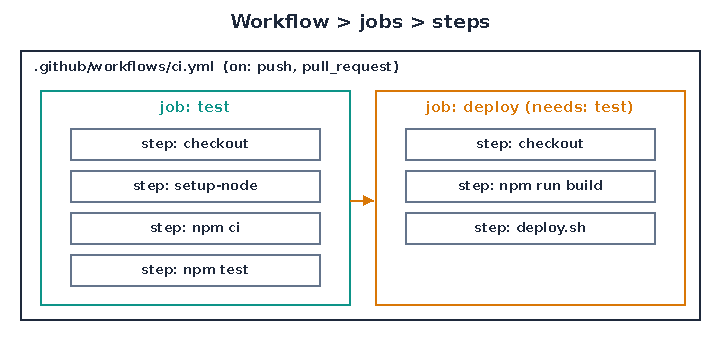
How GitHub Actions is organised#
| Term | Meaning |
|---|---|
| Workflow | A YAML file in .github/workflows/ |
Trigger (on) | What starts it: push, pull request, schedule |
| Job | A group of steps on one fresh machine (runner) |
| Step | A shell command or a reusable action |
| Action | A packaged step, e.g. actions/checkout |
Jobs run in parallel by default. Use needs to make one job wait for another.
Step 1: A CI workflow#
Create .github/workflows/ci.yml:
name: CI

on:
  push:
    branches: [main]
  pull_request:

jobs:
  test:
    runs-on: ubuntu-latest
    steps:
      - uses: actions/checkout@v4

      - uses: actions/setup-node@v4
        with:
          node-version: 22
          cache: npm

      - run: npm ci
      - run: npm run lint
      - run: npm test
That's a complete pipeline. On every pull request and every push to main, GitHub starts a clean Ubuntu machine, checks out your code, installs Node 22, installs dependencies and runs lint and tests. The result appears as a green tick or red cross on the pull request.
npm ciinstalls exactly what is inpackage-lock.json, which makes builds repeatable.cache: npmcaches downloaded packages between runs, so installs get much faster.
Action versions such as @v4 are major releases. Check each action's page for its latest major version when you set up a new workflow.
Step 2: Test on several Node versions#
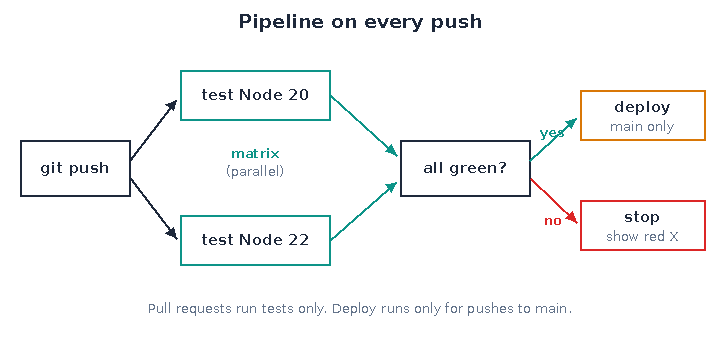
A matrix runs the same job once per value, in parallel:
jobs:
  test:
    runs-on: ubuntu-latest
    strategy:
      matrix:
        node: [20, 22]
    steps:
      - uses: actions/checkout@v4
      - uses: actions/setup-node@v4
        with:
          node-version: ${{ matrix.node }}
          cache: npm
      - run: npm ci
      - run: npm test
Step 3: Deploy only from main#
Add a second job that waits for tests and runs only for pushes to main, never for pull requests:
  deploy:
    needs: test
    if: github.event_name == 'push' && github.ref == 'refs/heads/main'
    runs-on: ubuntu-latest
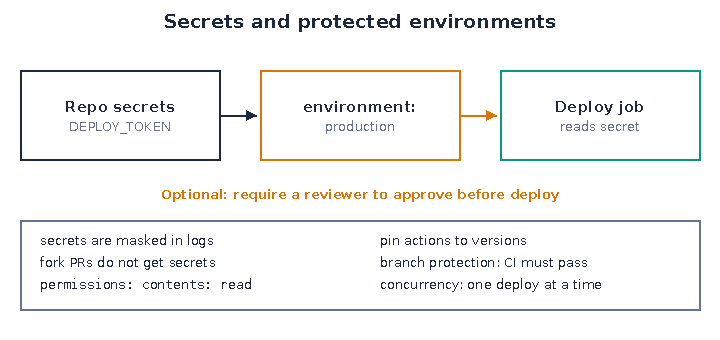
    environment: production
    concurrency: production
    steps:
      - uses: actions/checkout@v4
      - uses: actions/setup-node@v4
        with:
          node-version: 22
          cache: npm
      - run: npm ci
      - run: npm run build
      - run: ./scripts/deploy.sh
        env:
          DEPLOY_TOKEN: ${{ secrets.DEPLOY_TOKEN }}
needs: test: no deploy unless tests passed.environment: production: lets you require a manual approval and keep production secrets separate.concurrency: production: two deploys never run at the same time.
Secrets#
Store tokens and passwords under Settings → Secrets and variables → Actions, then read them with ${{ secrets.NAME }}. GitHub masks them in logs. Never hard-code secrets in the workflow file, and never echo them.
Keep pipelines fast#
- Cache dependencies (
cache: npm). - Run lint, unit tests and type checks as separate parallel jobs.
- Cancel outdated runs on the same branch:
concurrency:
  group: ci-${{ github.ref }}
  cancel-in-progress: true
Keep pipelines safe#
- Give the workflow the least permissions it needs, for example
permissions: contents: readat the top. - Pin third-party actions to a version, or to a full commit SHA for extra safety.
- Pull requests from forks don't receive your secrets by default; keep it that way.
- Protect
mainwith branch rules that require the CI check to pass before merging.
A failing step shows its full log in the Actions tab. Re-run just the failed jobs from there instead of pushing an empty commit.
Key takeaways#
- A workflow is a YAML file with triggers, jobs and steps.
- CI: checkout, setup Node with caching,
npm ci, lint, test on every PR. - CD: a deploy job with
needs, aniffor main and an environment for secrets and approvals. - Use secrets, least-privilege permissions and branch protection to keep it safe.