Docker Compose for Local Development: A Practical Guide
Run your app, database and cache with one command. Learn Docker Compose services, volumes, networks, health checks, environment variables and hot reload for local development.

A real app rarely runs alone. It needs a database, maybe a cache, maybe a queue. Installing all of that on every developer's laptop is slow and causes the classic "works on my machine" bug. Docker Compose describes the whole stack in one file and starts it with one command.
What Docker Compose does#
Docker runs one container. Compose runs a group of containers that work together, called services, and connects them on a private network. You describe everything in a compose.yaml file:
- which image each service uses, or how to build it
- which ports to expose to your machine
- environment variables
- volumes for data that must survive restarts
- which services depend on which
A complete example#
Here is a Node.js API with PostgreSQL and Redis:
# compose.yaml
services:
  api:
    build: .
    ports:
      - "3000:3000"
    env_file: .env
    environment:
      DATABASE_URL: postgres://app:secret@db:5432/app
      REDIS_URL: redis://cache:6379
    volumes:
      - ./src:/app/src
    depends_on:
      db:
        condition: service_healthy
      cache:
        condition: service_started

  db:
    image: postgres:16
    environment:
      POSTGRES_USER: app
      POSTGRES_PASSWORD: secret
      POSTGRES_DB: app
    ports:
      - "5432:5432"
    volumes:
      - db-data:/var/lib/postgresql/data
    healthcheck:
      test: ["CMD-SHELL", "pg_isready -U app"]
      interval: 5s
      retries: 10

  cache:
    image: redis:7

volumes:
  db-data:
And a simple Dockerfile for the API:
FROM node:22-alpine
WORKDIR /app
COPY package*.json ./
RUN npm ci
COPY . .
CMD ["npm", "run", "dev"]
The key ideas, one by one#
Services find each other by name#
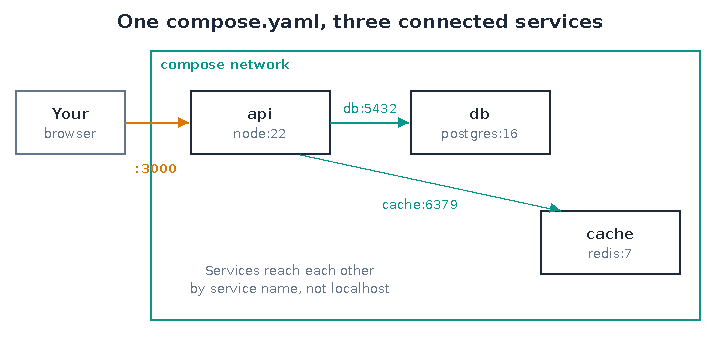
Compose puts all services on one network and gives each a hostname equal to its service name. That is why the API connects to db:5432 and cache:6379, not localhost. Inside a container, localhost means the container itself.
Ports: host first, container second#
"3000:3000" means port 3000 on your machine maps to port 3000 in the container. You only need to publish ports you want to reach from your browser or tools. The cache above has no ports entry, so only other services can reach it.
Volumes keep data and enable hot reload#
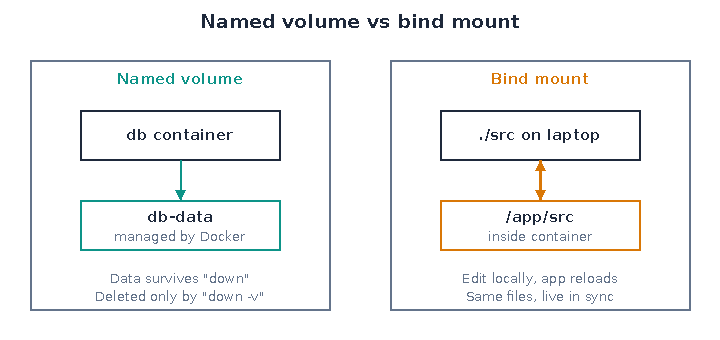
- Named volume (
db-data): Docker manages it, and your database survivesdocker compose down. - Bind mount (
./src:/app/src): your local folder appears inside the container, so a file watcher such asnodemonornode --watchrestarts the app when you save.
Health checks fix start-up races#
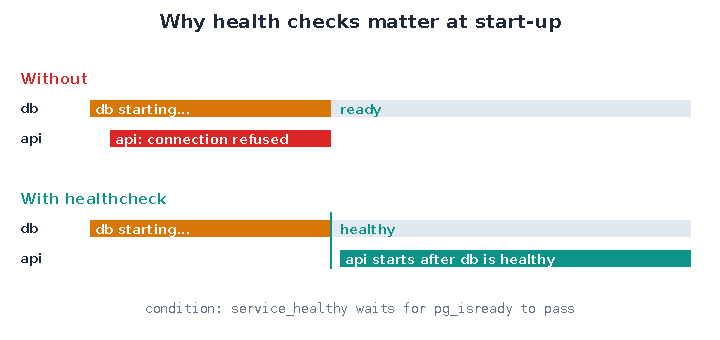
A plain depends_on only waits for the database container to start, not to be ready. With condition: service_healthy, Compose waits until the health check passes, so your API doesn't crash with "connection refused" on the first boot.
Commands you'll use every day#
| Command | What it does |
|---|---|
docker compose up -d | Start everything in the background |
docker compose up --build | Rebuild images, then start |
docker compose logs -f api | Follow one service's logs |
docker compose ps | List services and their status |
docker compose exec db psql -U app | Open a shell or tool inside a service |
docker compose down | Stop and remove containers |
docker compose down -v | Also delete volumes (wipes data) |
Modern Docker uses docker compose (with a space) built into the Docker CLI. The old docker-compose binary and the top-level version: key in the file are no longer needed.
Environment variables and secrets#
Put local settings in a .env file, load it with env_file, and add .env to .gitignore. Commit a .env.example with dummy values so teammates know what to fill in. The passwords in a local compose file are fine for development, but never reuse them in production.
Common problems#
- "Port is already allocated": something on your machine already uses that port. Stop it or change the host side, for example
"5433:5432". - Code changes don't show up: check the bind mount path, and make sure the dev command watches files.
- Database keeps old data: that is the named volume doing its job. Use
docker compose down -vto start fresh. node_modulesconflicts: mount onlysrc(as above), not the whole project, so the container keeps its own installed packages.
Key takeaways#
- Compose describes your whole stack in one
compose.yamland starts it withdocker compose up. - Services reach each other by service name, not
localhost. - Named volumes keep data; bind mounts give hot reload.
- Use health checks with
condition: service_healthyto avoid start-up races.