DHCP Explained: How Devices Get an IP Address Automatically
Learn how DHCP assigns IP addresses automatically using the DORA process, what a lease contains, lease renewal, relay agents and common troubleshooting.
DHCP (Dynamic Host Configuration Protocol) automatically gives devices the network settings they need to communicate. Without it, someone would have to type an IP address, mask, gateway and DNS servers into every phone and laptop by hand.
The DORA process#
When a device joins a network it has no IP address yet, so it can't talk directly to a server. DHCP solves this with a four-step exchange known as DORA:
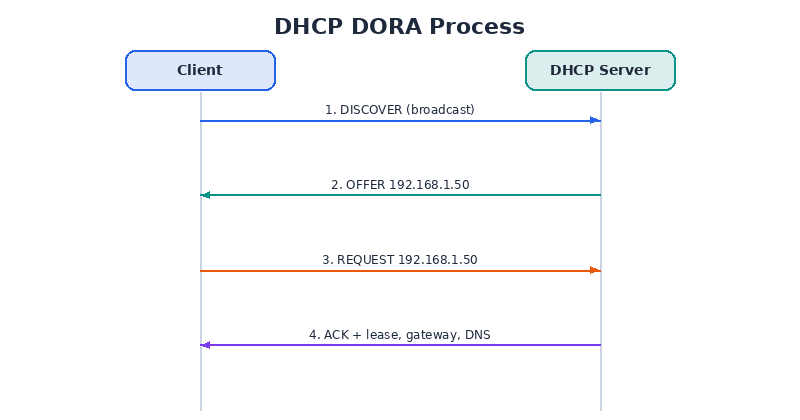
- Discover – the client broadcasts "Is there a DHCP server out there?" from source
0.0.0.0to255.255.255.255(UDP port 67). - Offer – a DHCP server replies with an available IP and its settings.
- Request – the client formally requests that offered address (still broadcast, so other servers know their offers were declined).
- Acknowledge – the server confirms, and the client configures its interface.
What a DHCP lease contains#
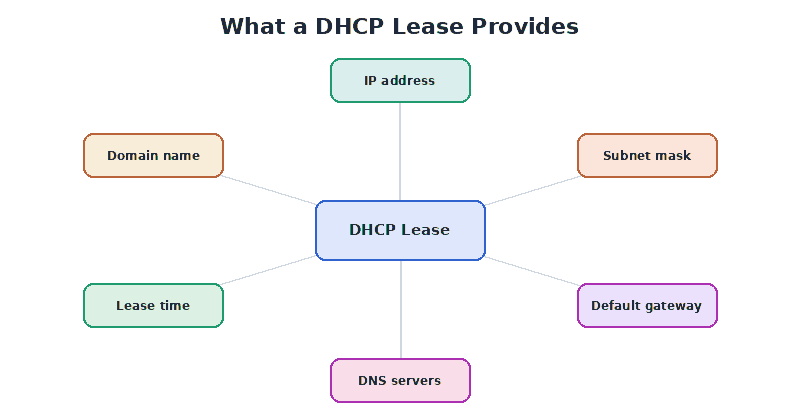
- IP address – the device's address on the network.
- Subnet mask – defines which addresses are local.
- Default gateway – the router used to reach other networks.
- DNS servers – where to send name lookups.
- Lease time – how long the address is valid.
- Optional extras like domain name, NTP servers or PXE boot settings.
Leases and renewal#
DHCP addresses are leased, not owned. This lets the server reclaim addresses from devices that leave.
- At 50% of the lease (T1), the client asks the same server to renew.
- At 87.5% (T2), if there was no reply, it asks any server.
- If the lease expires, the client must release the address and start DORA again.
Reservations and relay agents#
Static reservations#
Printers, servers and cameras often need a predictable IP. Instead of configuring them manually, create a DHCP reservation that always gives the same IP to a specific MAC address.
DHCP relay#
Broadcasts don't cross routers. In networks with many subnets or VLANs, a DHCP relay agent (often configured as ip helper-address on the router) forwards client broadcasts to a central DHCP server as unicast.
A rogue DHCP server can hand out a malicious gateway or DNS server and intercept traffic. Managed switches support DHCP snooping to allow DHCP offers only from trusted ports.
Troubleshooting DHCP#
| Symptom | Likely cause |
|---|---|
IP is 169.254.x.x | No DHCP server reached – check cable, Wi-Fi, VLAN or relay |
| "IP address conflict" | Static IP inside the DHCP pool, or duplicate reservation |
| New devices can't connect | DHCP pool exhausted – enlarge the range or shorten lease time |
| Internet works by IP, not by name | Wrong DNS servers in the lease |
# Windows: release and renew
ipconfig /release
ipconfig /renew

# Linux (dhclient)
sudo dhclient -r && sudo dhclient

# macOS
sudo ipconfig set en0 DHCP
Key takeaways#
- DHCP automates IP configuration using Discover, Offer, Request, Acknowledge.
- A lease includes IP, mask, gateway, DNS and lease time.
- Clients renew at 50% of the lease time.
- Use reservations for fixed IPs and relay agents across subnets.
- A 169.254.x.x address means DHCP failed.