CSS Architecture Interview Questions: BEM, CSS Modules, Tailwind, CSS-in-JS and Specificity
12 CSS architecture interview questions with examples: specificity and the cascade, BEM naming, CSS Modules, utility-first CSS with Tailwind, CSS-in-JS trade-offs, custom properties and design tokens, cascade layers, :where() and :is(), Sass, theming and dark mode, and avoiding !important.
Writing CSS that works is easy; writing CSS that a team can change safely for years is hard. Mid-level interviews often ask how you'd organise styles in a large codebase. These 12 CSS architecture interview questions cover the cascade, naming conventions, scoping tools, tokens and modern features like cascade layers.
Why CSS gets messy#
Q1. What problems does CSS architecture solve?#
Answer: CSS has a single global namespace and rules interact through the cascade. In large projects that leads to:
- Naming collisions: two teams both write
.card. - Specificity wars: selectors get longer and
!importantspreads to override each other. - Dead code: nobody dares delete a rule because they don't know what uses it.
- Inconsistency: 14 slightly different greys and paddings.
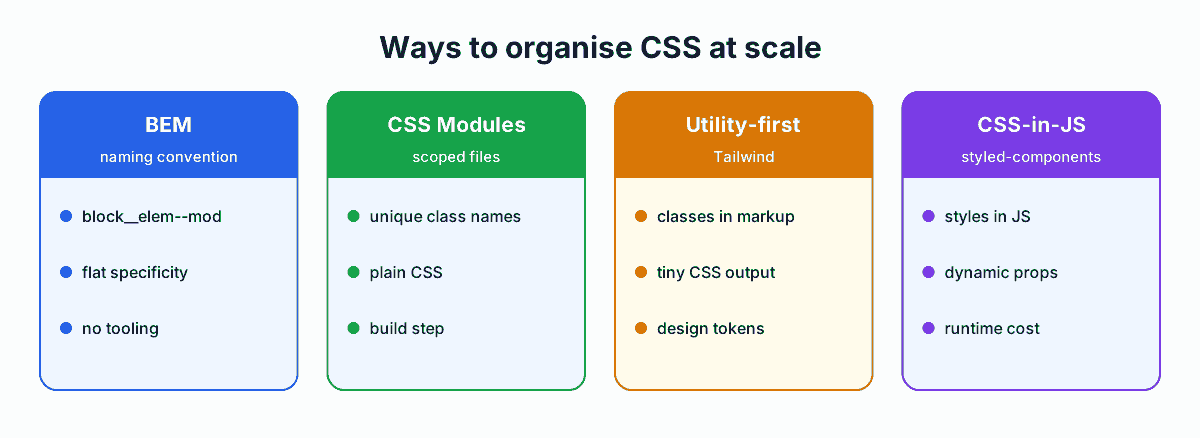
Architecture approaches fix this by scoping styles (BEM, CSS Modules, CSS-in-JS), constraining choices (utility classes, design tokens) and controlling the cascade (low specificity, cascade layers).
Q2. How is specificity calculated?#
| Selector | Specificity (a, b, c) |
|---|---|
p | (0, 0, 1) |
.btn, [type="text"], :hover | (0, 1, 0) |
#header | (1, 0, 0) |
nav ul li a.active | (0, 1, 4) |
#main .card:hover h2 | (1, 2, 1) |
Inline style="" | Beats all selectors |
!important | Beats normal declarations |
Answer: compare IDs first, then classes/attributes/pseudo-classes, then elements; a higher column always wins regardless of the others. If specificity is equal, the rule that comes later wins. * and combinators add nothing; :where() adds zero; :is() and :not() take the specificity of their most specific argument.
Keep specificity low and flat: style with single classes, avoid IDs in CSS, and avoid deep nesting. Then order and layers, not selector length, decide which rule wins.
Naming and scoping#
Q3. What is BEM? Show an example#
<article class="card card--featured">
  <img class="card__image" src="..." alt="..." />
  <h3 class="card__title">Learn CSS</h3>
  <button class="card__button card__button--primary">Read</button>
</article>.card { border-radius: 8px; padding: 16px; }
.card--featured { border: 2px solid gold; }
.card__title { font-size: 1.25rem; }
.card__button--primary { background: var(--color-primary); }Answer: BEM stands for Block (standalone component), Element (a part of the block, __) and Modifier (a variant or state, --). Every selector is a single class, so specificity stays flat and names are self-documenting. It needs no tooling, but names get long and it relies on team discipline.
Q4. What are CSS Modules?#
/* Button.module.css */
.button { padding: 8px 16px; border-radius: 6px; }
.primary { background: var(--color-primary); color: white; }import styles from "./Button.module.css";
export function Button({ variant = "primary", children }) {
return (
<button className={`${styles.button} ${styles[variant]}`}>{children}</button>
);
}
// Rendered class: "Button_button__x7a2k Button_primary__9fd1e"Answer: CSS Modules are normal CSS files where class names are locally scoped by the build tool, which renames them to unique hashes. You get plain CSS with no runtime cost and no naming collisions. They're supported out of the box by Vite, Next.js and Create React App. Use :global(.x) to opt out.
Q5. What is utility-first CSS (Tailwind)? What are its pros and cons?#
<button class="rounded-md bg-blue-600 px-4 py-2 text-white hover:bg-blue-700
               focus-visible:outline focus-visible:outline-2 disabled:opacity-50">
  Save
</button>| Pros | Cons |
|---|---|
| No naming; styles live next to markup | Long class lists can hurt readability |
| Design tokens enforced (spacing and colour scales) | Learning the class vocabulary |
| Tiny CSS output: only used classes are generated | Repetition unless you extract components |
| Safe to delete markup; no dead CSS | Mixing concerns, some argue |
Answer: utility-first means composing designs from small, single-purpose classes. Repetition is handled by extracting components (a React Button), not by writing new CSS classes.
Q6. What are the trade-offs of CSS-in-JS?#
import styled from "styled-components";

const Button = styled.button`
  padding: 8px 16px;
  background: ${(props) => (props.$primary ? "var(--color-primary)" : "transparent")};
`;

<Button $primary>Save</Button>
Answer: runtime CSS-in-JS (styled-components, Emotion) colocates styles with components, scopes them automatically and makes dynamic styles from props easy. The costs are runtime overhead (styles are generated and injected while rendering), larger bundles, and friction with React Server Components and streaming SSR. That's why many teams have moved to zero-runtime options that extract static CSS at build time (vanilla-extract, Panda CSS, Linaria) or to CSS Modules and Tailwind.
Tokens, layers and modern CSS#
Q7. What are CSS custom properties and design tokens?#
:root {
  /* Primitive tokens */
  --blue-600: #2563eb;
  --space-2: 0.5rem;
  --space-4: 1rem;
  /* Semantic tokens */
  --color-primary: var(--blue-600);
  --color-text: #1f2937;
  --radius-md: 6px;
}

.button {
  padding: var(--space-2) var(--space-4);
  background: var(--color-primary);
  border-radius: var(--radius-md);
}
Answer: custom properties are variables that live in the browser, cascade and inherit, and can be changed at runtime (unlike Sass variables, which are compiled away). Design tokens are the named values of a design system: colours, spacing, type scale, radii and shadows. Using semantic tokens (--color-primary) rather than raw values means a rebrand or theme change touches one place.
Q8. How do you implement dark mode and theming?#
:root {
  --color-bg: #ffffff;
  --color-text: #111827;
  color-scheme: light dark;
}

@media (prefers-color-scheme: dark) {
  :root:not([data-theme="light"]) {
    --color-bg: #0f172a;
    --color-text: #e5e7eb;
  }
}

:root[data-theme="dark"] {
  --color-bg: #0f172a;
  --color-text: #e5e7eb;
}

body { background: var(--color-bg); color: var(--color-text); }
Answer: components use only semantic variables, and the theme swaps the variable values. Respect the OS preference with prefers-color-scheme, let users override it with a data-theme attribute (saved in localStorage), and set color-scheme so form controls and scrollbars match. Apply the saved theme before first paint to avoid a flash of the wrong theme.
Q9. What are cascade layers (@layer)?#
@layer reset, base, components, utilities;

@layer reset {
  * { margin: 0; box-sizing: border-box; }
}
@layer components {
  .card .title { color: navy; }        /* higher specificity... */
}
@layer utilities {
  .text-red { color: red; }            /* ...but this wins: later layer */
}
Answer: layers let you decide the cascade order explicitly. A rule in a later layer beats a rule in an earlier layer regardless of specificity. Unlayered styles beat all layers. This solves specificity battles between resets, third-party libraries, components and utilities: import a library into a low layer and your component styles win without hacks. (Note: for !important declarations the layer order reverses.)
Q10. How do :where() and :is() help, and why avoid !important?#
/* :where() has zero specificity: easy to override */
:where(.prose) :where(h1, h2, h3) { margin-top: 1.5em; }

/* :is() groups selectors but takes the highest specificity inside */
:is(header, footer) a:hover { text-decoration: underline; }
Answer: :where() is ideal for resets and library defaults because anything overrides it. !important breaks normal cascade logic; the only way to beat it is another !important, which escalates. Legitimate uses are rare: utility classes meant to always win, or overriding inline styles from third-party code. Prefer fixing the source of the conflict, using layers, or lowering specificity.
Tooling and organisation#
Q11. What do Sass and native CSS nesting provide?#
/* Native CSS nesting (supported in modern browsers) */
.card {
  padding: 1rem;
  &:hover { box-shadow: 0 2px 8px rgb(0 0 0 / 0.1); }
  & .card__title { font-weight: 600; }
  @media (min-width: 768px) { padding: 2rem; }
}
Answer: preprocessors like Sass added variables, nesting, mixins, functions and partials before CSS had them. Today native CSS has custom properties, nesting, calc(), clamp(), color-mix() and layers, so many projects need Sass less. Whatever you use, limit nesting to two or three levels to avoid long, high-specificity selectors. PostCSS plugins (Autoprefixer) still handle vendor prefixes and future syntax.
Q12. How would you structure CSS for a large application?#
Answer: a sensible, framework-agnostic structure:
- Tokens: one source of truth for colours, spacing, type and radii as custom properties (often generated from design tools).
- Reset and base: a modern reset plus element defaults (typography, links, focus styles) in low layers.
- Layout primitives: reusable patterns like stack, cluster, grid and container.
- Components: scoped styles (CSS Modules, BEM or Tailwind components) that only use tokens.
- Utilities: a small set of single-purpose classes in the highest layer.
Back it with Stylelint rules (no IDs, max nesting depth, no hard-coded colours), a component library documented in Storybook, and visual regression tests. Approaches like ITCSS and CUBE CSS formalise this layering.
Quick revision#
| Approach | Scoping | Runtime cost | Good for |
|---|---|---|---|
| BEM | Naming convention | None | Any project, no tooling |
| CSS Modules | Build-time hashing | None | Component apps with plain CSS |
| Tailwind | Utilities in markup | None | Fast, consistent UI building |
| Runtime CSS-in-JS | Generated classes | Yes | Highly dynamic styling |
| Zero-runtime CSS-in-JS | Extracted at build | None | Typed styles without runtime |
Related: Flexbox and Grid interview questions and CSS interview questions for freshers.
Key takeaways#
- Large-scale CSS problems come from the global namespace and specificity conflicts.
- Keep specificity low and flat; use single classes and avoid IDs and deep nesting.
- Scope styles with BEM, CSS Modules, Tailwind or (zero-runtime) CSS-in-JS.
- Drive everything from semantic design tokens in custom properties, which also makes theming easy.
- Use
@layerand:where()to control the cascade instead of!important.